> ## Documentation Index
> Fetch the complete documentation index at: https://cometchat-22654f5b-docs-llms-scoped-indexes.mintlify.site/llms.txt
> Use this file to discover all available pages before exploring further.
# Notification Feed
> Full-screen notification feed component with category filtering, card rendering, real-time updates, and engagement reporting.
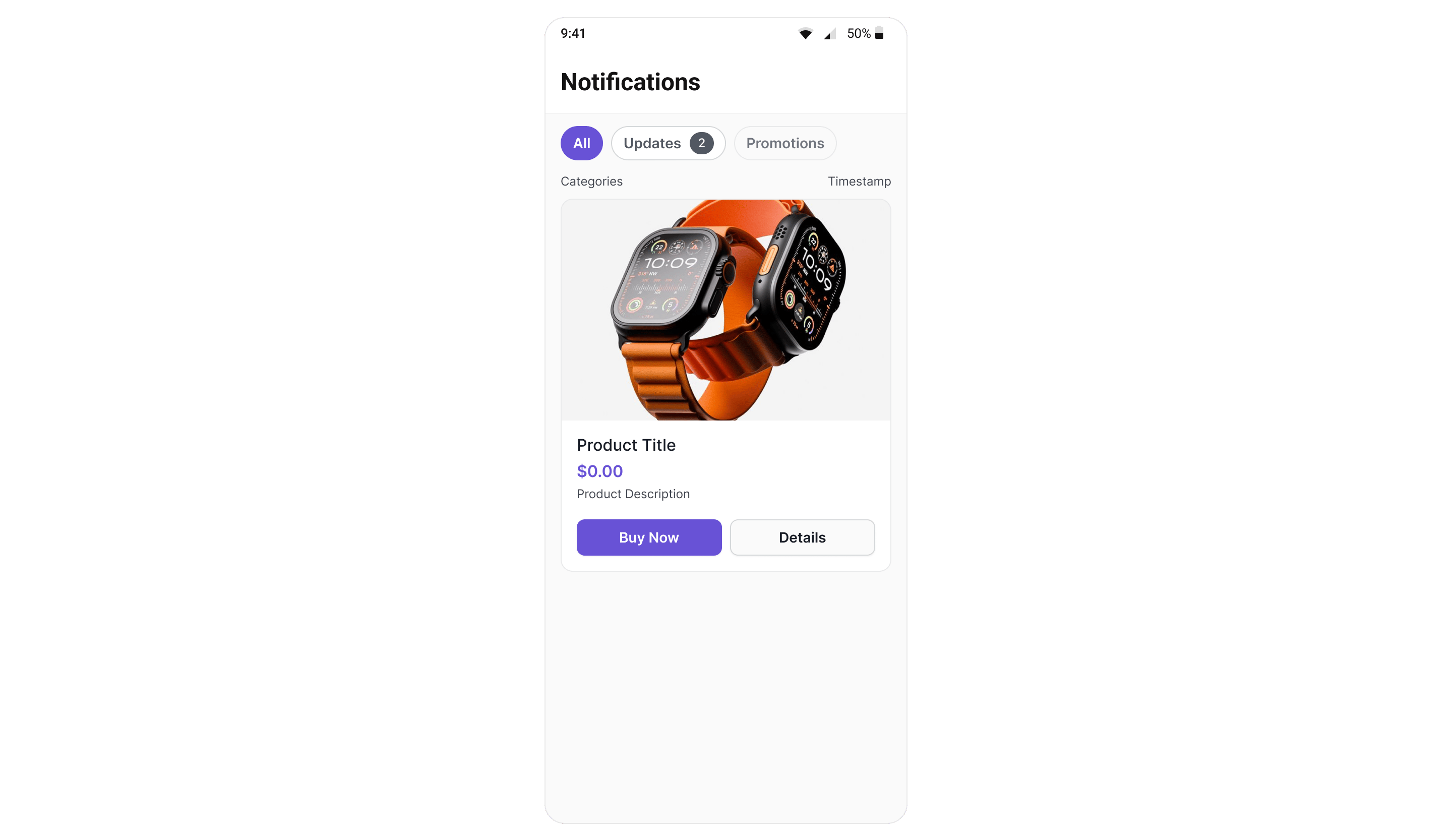
`CometChatNotificationFeed` displays a scrollable notification feed where each item is rendered as a native card using the CometChat Cards library. It handles fetching, pagination, category filtering, timestamp grouping, real-time updates, and read/delivered/engagement reporting automatically.
 ***
## Where It Fits
`CometChatNotificationFeed` is a full-screen component. Drop it into an Activity, Fragment, or navigation destination. It manages its own data fetching, state, and real-time listeners — you just handle navigation callbacks.
```kotlin theme={null}
@Composable
fun NotificationsScreen(onBack: () -> Unit) {
CometChatNotificationFeed(
modifier = Modifier.fillMaxSize(),
showBackButton = true,
onBackPress = onBack,
onItemClick = { item ->
// Handle item tap (e.g., open detail or deep link)
}
)
}
```
```xml theme={null}
```
```kotlin theme={null}
val feed = findViewById(R.id.notificationFeed)
feed.init(this) // Pass Activity or Fragment — needed to create the ViewModel
feed.onItemClick = { item -> /* navigate */ }
feed.onBackPress = { finish() }
```
***
## Quick Start
```kotlin theme={null}
@Composable
fun NotificationsScreen() {
CometChatNotificationFeed(
modifier = Modifier.fillMaxSize()
)
}
```
```kotlin theme={null}
override fun onCreate(savedInstanceState: Bundle?) {
super.onCreate(savedInstanceState)
val feed = CometChatNotificationFeed(this)
setContentView(feed)
feed.init(this) // Required — binds the ViewModel to this Activity's lifecycle
}
```
Prerequisites: CometChat SDK initialized with `CometChatUIKit.init()` and a user logged in.
***
## Filtering Feed Items
Control what loads using custom request builders:
```kotlin theme={null}
CometChatNotificationFeed(
feedRequestBuilder = NotificationFeedRequest.NotificationFeedRequestBuilder()
.setLimit(30)
.setReadState(FeedReadState.UNREAD)
.setCategory("promotions")
)
```
```kotlin theme={null}
feed.setFeedRequestBuilder(
NotificationFeedRequest.NotificationFeedRequestBuilder()
.setLimit(30)
.setReadState(FeedReadState.UNREAD)
.setCategory("promotions")
)
feed.init(this)
```
### Filter Options
| Builder Method | Description |
| - | - |
| `.setLimit(int)` | Items per page (default 20, max 100) |
| `.setReadState(FeedReadState)` | `READ`, `UNREAD`, or `ALL` |
| `.setCategory(String)` | Filter by category ID |
| `.setChannelId(String)` | Filter by channel |
| `.setTags(List)` | Filter by tags |
| `.setDateFrom(String)` | ISO 8601 date lower bound |
| `.setDateTo(String)` | ISO 8601 date upper bound |
Pass the builder object, not the result of `.build()`. The component calls `.build()` internally.
***
## Actions and Events
### Callback Methods
#### `onItemClick`
Fires when a feed item card is tapped.
```kotlin theme={null}
CometChatNotificationFeed(
onItemClick = { item ->
// item.id, item.content (Card JSON), item.category
}
)
```
```kotlin theme={null}
feed.onItemClick = { item ->
// Handle item tap
}
```
#### `onActionClick`
Fires when an interactive element (button, link) inside a card is tapped.
```kotlin theme={null}
CometChatNotificationFeed(
onActionClick = { item, actionMap ->
// actionMap contains action type and parameters
val actionType = actionMap["type"] as? String
when (actionType) {
"openUrl" -> openBrowser(actionMap["url"] as String)
"chatWithUser" -> navigateToChat(actionMap["uid"] as String)
}
}
)
```
```kotlin theme={null}
feed.onActionClick = { item, actionMap ->
val actionType = actionMap["type"] as? String
// Handle action
}
```
#### `onError`
Fires when an internal error occurs (network failure, SDK exception).
```kotlin theme={null}
CometChatNotificationFeed(
onError = { exception ->
Log.e("Feed", "Error: ${exception.message}")
}
)
```
```kotlin theme={null}
feed.onError = { exception ->
Log.e("Feed", "Error: ${exception.message}")
}
```
#### `onBackPress`
Fires when the back button in the header is tapped.
```kotlin theme={null}
CometChatNotificationFeed(
showBackButton = true,
onBackPress = { /* navigate back */ }
)
```
```kotlin theme={null}
feed.setShowBackButton(true)
feed.onBackPress = { finish() }
```
### Automatic Behaviors
The component handles these automatically — no manual setup needed:
| Behavior | Description |
| - | - |
| Real-time updates | New items appear at the top via WebSocket listener |
| Delivery reporting | Items are reported as delivered when fetched |
| Read reporting | Items are reported as read after 1 second of visibility |
| Unread count polling | Polls unread count every 30 seconds to update badges |
| Infinite scroll | Fetches next page when scrolling near the bottom |
| Pull-to-refresh | Resets and fetches fresh data on pull |
| Timestamp grouping | Groups items as "Today", "Yesterday", day name, or date |
| Category filtering | Filter chips row for category-based filtering |
***
## Functionality
| Method (XML Views) | Compose Parameter | Description |
| - | - | - |
| `setTitle("Notifications")` | `title = "Notifications"` | Header title text |
| `setShowHeader(true)` | `showHeader = true` | Toggle header visibility |
| `setShowBackButton(false)` | `showBackButton = false` | Toggle back button |
| `setShowFilterChips(true)` | `showFilterChips = true` | Toggle category filter chips |
| `setFeedRequestBuilder(...)` | `feedRequestBuilder = ...` | Custom feed request |
| `setCategoriesRequestBuilder(...)` | `categoriesRequestBuilder = ...` | Custom categories request |
***
## Custom View Slots
### Header View
Replace the entire header:
```kotlin theme={null}
CometChatNotificationFeed(
headerView = {
Row(
modifier = Modifier.fillMaxWidth().padding(16.dp),
verticalAlignment = Alignment.CenterVertically
) {
Text("My Notifications", style = CometChatTheme.typography.heading1Bold)
}
}
)
```
### State Views
```kotlin theme={null}
CometChatNotificationFeed(
emptyStateView = {
Column(
modifier = Modifier.fillMaxSize(),
horizontalAlignment = Alignment.CenterHorizontally,
verticalArrangement = Arrangement.Center
) {
Text("No notifications yet")
}
},
errorStateView = { exception, onRetry ->
Column(horizontalAlignment = Alignment.CenterHorizontally) {
Text("Something went wrong")
Button(onClick = onRetry) { Text("Retry") }
}
},
loadingStateView = {
Box(modifier = Modifier.fillMaxSize(), contentAlignment = Alignment.Center) {
CircularProgressIndicator()
}
}
)
```
***
## Style
```kotlin theme={null}
CometChatNotificationFeed(
style = CometChatNotificationFeedStyle(
backgroundColor = Color(0xFFF5F5F5),
headerBackgroundColor = Color.White,
headerTitleColor = Color(0xFF141414),
chipActiveBackgroundColor = Color(0xFF3399FF),
chipActiveTextColor = Color.White,
chipInactiveBackgroundColor = Color.White,
chipInactiveTextColor = Color(0xFF727272),
cardBackgroundColor = Color.White,
cardBorderColor = Color(0xFFE0E0E0),
cardBorderRadius = 12.dp,
unreadIndicatorColor = Color(0xFF3399FF)
)
)
```
```kotlin theme={null}
feed.setStyle(CometChatNotificationFeedStyle(
backgroundColor = Color.parseColor("#F5F5F5"),
headerTitleColor = Color.parseColor("#141414"),
chipActiveBackgroundColor = Color.parseColor("#3399FF"),
chipActiveTextColor = Color.WHITE,
chipInactiveBackgroundColor = Color.TRANSPARENT,
chipInactiveTextColor = Color.DKGRAY,
cardBackgroundColor = Color.WHITE,
cardBorderColor = Color.parseColor("#E0E0E0"),
unreadIndicatorColor = Color.parseColor("#3399FF")
))
```
### Style Properties
| Property | Description |
| - | - |
| `backgroundColor` | Screen background color |
| `headerBackgroundColor` | Header bar background |
| `headerTitleColor` | Header title text color |
| `headerBorderColor` | Divider below header |
| `chipActiveBackgroundColor` | Selected filter chip background |
| `chipActiveTextColor` | Selected filter chip text |
| `chipInactiveBackgroundColor` | Unselected filter chip background |
| `chipInactiveTextColor` | Unselected filter chip text |
| `chipBorderColor` | Filter chip border |
| `badgeActiveBackgroundColor` | Active chip badge background |
| `badgeActiveTextColor` | Active chip badge text |
| `badgeInactiveBackgroundColor` | Inactive chip badge background |
| `badgeInactiveTextColor` | Inactive chip badge text |
| `timestampTextColor` | Section header timestamp color |
| `cardBackgroundColor` | Card container background |
| `cardBorderColor` | Card container border |
| `cardBorderRadius` | Card corner radius |
| `cardBorderWidth` | Card border width |
| `unreadIndicatorColor` | Unread dot indicator color |
| `separatorColor` | Separator between cards |
All colors default to `Color.Unspecified` (Compose) or `0` (XML) to inherit from `CometChatTheme`. Override individual values without losing theme support.
***
## ViewModel Access
The component uses `CometChatNotificationFeedViewModel` from the shared `chatuikit-core` module. You can provide a custom ViewModel for advanced scenarios:
```kotlin theme={null}
val viewModel: CometChatNotificationFeedViewModel = viewModel(
factory = CometChatNotificationFeedViewModelFactory(
feedRequestBuilder = customBuilder,
pollingIntervalMs = 60_000L // 1 minute polling
)
)
CometChatNotificationFeed(
viewModel = viewModel
)
```
### ViewModel Factory Parameters
| Parameter | Default | Description |
| - | - | - |
| `feedRequestBuilder` | null | Custom feed request builder |
| `categoriesRequestBuilder` | null | Custom categories request builder |
| `enableListeners` | true | Enable WebSocket listeners (false for testing) |
| `pollingIntervalMs` | 30000 | Unread count polling interval in ms |
***
## Common Patterns
### Show only unread items
```kotlin theme={null}
CometChatNotificationFeed(
feedRequestBuilder = NotificationFeedRequest.NotificationFeedRequestBuilder()
.setReadState(FeedReadState.UNREAD)
)
```
### Hide filter chips and header
```kotlin theme={null}
CometChatNotificationFeed(
showHeader = false,
showFilterChips = false
)
```
```kotlin theme={null}
feed.setShowHeader(false)
feed.setShowFilterChips(false)
```
### Custom categories request
```kotlin theme={null}
CometChatNotificationFeed(
categoriesRequestBuilder = NotificationCategoriesRequest.NotificationCategoriesRequestBuilder()
.setLimit(10)
)
```
***
## Next Steps
Overview of how campaigns work end-to-end
Low-level SDK APIs for feed items, categories, and engagement
Full styling reference for all components
Custom ViewModels, repositories, and ListOperations
This documentation is built and hosted on [Mintlify](https://mintlify.com), a developer documentation platform.
***
## Where It Fits
`CometChatNotificationFeed` is a full-screen component. Drop it into an Activity, Fragment, or navigation destination. It manages its own data fetching, state, and real-time listeners — you just handle navigation callbacks.
```kotlin theme={null}
@Composable
fun NotificationsScreen(onBack: () -> Unit) {
CometChatNotificationFeed(
modifier = Modifier.fillMaxSize(),
showBackButton = true,
onBackPress = onBack,
onItemClick = { item ->
// Handle item tap (e.g., open detail or deep link)
}
)
}
```
```xml theme={null}
```
```kotlin theme={null}
val feed = findViewById(R.id.notificationFeed)
feed.init(this) // Pass Activity or Fragment — needed to create the ViewModel
feed.onItemClick = { item -> /* navigate */ }
feed.onBackPress = { finish() }
```
***
## Quick Start
```kotlin theme={null}
@Composable
fun NotificationsScreen() {
CometChatNotificationFeed(
modifier = Modifier.fillMaxSize()
)
}
```
```kotlin theme={null}
override fun onCreate(savedInstanceState: Bundle?) {
super.onCreate(savedInstanceState)
val feed = CometChatNotificationFeed(this)
setContentView(feed)
feed.init(this) // Required — binds the ViewModel to this Activity's lifecycle
}
```
Prerequisites: CometChat SDK initialized with `CometChatUIKit.init()` and a user logged in.
***
## Filtering Feed Items
Control what loads using custom request builders:
```kotlin theme={null}
CometChatNotificationFeed(
feedRequestBuilder = NotificationFeedRequest.NotificationFeedRequestBuilder()
.setLimit(30)
.setReadState(FeedReadState.UNREAD)
.setCategory("promotions")
)
```
```kotlin theme={null}
feed.setFeedRequestBuilder(
NotificationFeedRequest.NotificationFeedRequestBuilder()
.setLimit(30)
.setReadState(FeedReadState.UNREAD)
.setCategory("promotions")
)
feed.init(this)
```
### Filter Options
| Builder Method | Description |
| - | - |
| `.setLimit(int)` | Items per page (default 20, max 100) |
| `.setReadState(FeedReadState)` | `READ`, `UNREAD`, or `ALL` |
| `.setCategory(String)` | Filter by category ID |
| `.setChannelId(String)` | Filter by channel |
| `.setTags(List)` | Filter by tags |
| `.setDateFrom(String)` | ISO 8601 date lower bound |
| `.setDateTo(String)` | ISO 8601 date upper bound |
Pass the builder object, not the result of `.build()`. The component calls `.build()` internally.
***
## Actions and Events
### Callback Methods
#### `onItemClick`
Fires when a feed item card is tapped.
```kotlin theme={null}
CometChatNotificationFeed(
onItemClick = { item ->
// item.id, item.content (Card JSON), item.category
}
)
```
```kotlin theme={null}
feed.onItemClick = { item ->
// Handle item tap
}
```
#### `onActionClick`
Fires when an interactive element (button, link) inside a card is tapped.
```kotlin theme={null}
CometChatNotificationFeed(
onActionClick = { item, actionMap ->
// actionMap contains action type and parameters
val actionType = actionMap["type"] as? String
when (actionType) {
"openUrl" -> openBrowser(actionMap["url"] as String)
"chatWithUser" -> navigateToChat(actionMap["uid"] as String)
}
}
)
```
```kotlin theme={null}
feed.onActionClick = { item, actionMap ->
val actionType = actionMap["type"] as? String
// Handle action
}
```
#### `onError`
Fires when an internal error occurs (network failure, SDK exception).
```kotlin theme={null}
CometChatNotificationFeed(
onError = { exception ->
Log.e("Feed", "Error: ${exception.message}")
}
)
```
```kotlin theme={null}
feed.onError = { exception ->
Log.e("Feed", "Error: ${exception.message}")
}
```
#### `onBackPress`
Fires when the back button in the header is tapped.
```kotlin theme={null}
CometChatNotificationFeed(
showBackButton = true,
onBackPress = { /* navigate back */ }
)
```
```kotlin theme={null}
feed.setShowBackButton(true)
feed.onBackPress = { finish() }
```
### Automatic Behaviors
The component handles these automatically — no manual setup needed:
| Behavior | Description |
| - | - |
| Real-time updates | New items appear at the top via WebSocket listener |
| Delivery reporting | Items are reported as delivered when fetched |
| Read reporting | Items are reported as read after 1 second of visibility |
| Unread count polling | Polls unread count every 30 seconds to update badges |
| Infinite scroll | Fetches next page when scrolling near the bottom |
| Pull-to-refresh | Resets and fetches fresh data on pull |
| Timestamp grouping | Groups items as "Today", "Yesterday", day name, or date |
| Category filtering | Filter chips row for category-based filtering |
***
## Functionality
| Method (XML Views) | Compose Parameter | Description |
| - | - | - |
| `setTitle("Notifications")` | `title = "Notifications"` | Header title text |
| `setShowHeader(true)` | `showHeader = true` | Toggle header visibility |
| `setShowBackButton(false)` | `showBackButton = false` | Toggle back button |
| `setShowFilterChips(true)` | `showFilterChips = true` | Toggle category filter chips |
| `setFeedRequestBuilder(...)` | `feedRequestBuilder = ...` | Custom feed request |
| `setCategoriesRequestBuilder(...)` | `categoriesRequestBuilder = ...` | Custom categories request |
***
## Custom View Slots
### Header View
Replace the entire header:
```kotlin theme={null}
CometChatNotificationFeed(
headerView = {
Row(
modifier = Modifier.fillMaxWidth().padding(16.dp),
verticalAlignment = Alignment.CenterVertically
) {
Text("My Notifications", style = CometChatTheme.typography.heading1Bold)
}
}
)
```
### State Views
```kotlin theme={null}
CometChatNotificationFeed(
emptyStateView = {
Column(
modifier = Modifier.fillMaxSize(),
horizontalAlignment = Alignment.CenterHorizontally,
verticalArrangement = Arrangement.Center
) {
Text("No notifications yet")
}
},
errorStateView = { exception, onRetry ->
Column(horizontalAlignment = Alignment.CenterHorizontally) {
Text("Something went wrong")
Button(onClick = onRetry) { Text("Retry") }
}
},
loadingStateView = {
Box(modifier = Modifier.fillMaxSize(), contentAlignment = Alignment.Center) {
CircularProgressIndicator()
}
}
)
```
***
## Style
```kotlin theme={null}
CometChatNotificationFeed(
style = CometChatNotificationFeedStyle(
backgroundColor = Color(0xFFF5F5F5),
headerBackgroundColor = Color.White,
headerTitleColor = Color(0xFF141414),
chipActiveBackgroundColor = Color(0xFF3399FF),
chipActiveTextColor = Color.White,
chipInactiveBackgroundColor = Color.White,
chipInactiveTextColor = Color(0xFF727272),
cardBackgroundColor = Color.White,
cardBorderColor = Color(0xFFE0E0E0),
cardBorderRadius = 12.dp,
unreadIndicatorColor = Color(0xFF3399FF)
)
)
```
```kotlin theme={null}
feed.setStyle(CometChatNotificationFeedStyle(
backgroundColor = Color.parseColor("#F5F5F5"),
headerTitleColor = Color.parseColor("#141414"),
chipActiveBackgroundColor = Color.parseColor("#3399FF"),
chipActiveTextColor = Color.WHITE,
chipInactiveBackgroundColor = Color.TRANSPARENT,
chipInactiveTextColor = Color.DKGRAY,
cardBackgroundColor = Color.WHITE,
cardBorderColor = Color.parseColor("#E0E0E0"),
unreadIndicatorColor = Color.parseColor("#3399FF")
))
```
### Style Properties
| Property | Description |
| - | - |
| `backgroundColor` | Screen background color |
| `headerBackgroundColor` | Header bar background |
| `headerTitleColor` | Header title text color |
| `headerBorderColor` | Divider below header |
| `chipActiveBackgroundColor` | Selected filter chip background |
| `chipActiveTextColor` | Selected filter chip text |
| `chipInactiveBackgroundColor` | Unselected filter chip background |
| `chipInactiveTextColor` | Unselected filter chip text |
| `chipBorderColor` | Filter chip border |
| `badgeActiveBackgroundColor` | Active chip badge background |
| `badgeActiveTextColor` | Active chip badge text |
| `badgeInactiveBackgroundColor` | Inactive chip badge background |
| `badgeInactiveTextColor` | Inactive chip badge text |
| `timestampTextColor` | Section header timestamp color |
| `cardBackgroundColor` | Card container background |
| `cardBorderColor` | Card container border |
| `cardBorderRadius` | Card corner radius |
| `cardBorderWidth` | Card border width |
| `unreadIndicatorColor` | Unread dot indicator color |
| `separatorColor` | Separator between cards |
All colors default to `Color.Unspecified` (Compose) or `0` (XML) to inherit from `CometChatTheme`. Override individual values without losing theme support.
***
## ViewModel Access
The component uses `CometChatNotificationFeedViewModel` from the shared `chatuikit-core` module. You can provide a custom ViewModel for advanced scenarios:
```kotlin theme={null}
val viewModel: CometChatNotificationFeedViewModel = viewModel(
factory = CometChatNotificationFeedViewModelFactory(
feedRequestBuilder = customBuilder,
pollingIntervalMs = 60_000L // 1 minute polling
)
)
CometChatNotificationFeed(
viewModel = viewModel
)
```
### ViewModel Factory Parameters
| Parameter | Default | Description |
| - | - | - |
| `feedRequestBuilder` | null | Custom feed request builder |
| `categoriesRequestBuilder` | null | Custom categories request builder |
| `enableListeners` | true | Enable WebSocket listeners (false for testing) |
| `pollingIntervalMs` | 30000 | Unread count polling interval in ms |
***
## Common Patterns
### Show only unread items
```kotlin theme={null}
CometChatNotificationFeed(
feedRequestBuilder = NotificationFeedRequest.NotificationFeedRequestBuilder()
.setReadState(FeedReadState.UNREAD)
)
```
### Hide filter chips and header
```kotlin theme={null}
CometChatNotificationFeed(
showHeader = false,
showFilterChips = false
)
```
```kotlin theme={null}
feed.setShowHeader(false)
feed.setShowFilterChips(false)
```
### Custom categories request
```kotlin theme={null}
CometChatNotificationFeed(
categoriesRequestBuilder = NotificationCategoriesRequest.NotificationCategoriesRequestBuilder()
.setLimit(10)
)
```
***
## Next Steps
Overview of how campaigns work end-to-end
Low-level SDK APIs for feed items, categories, and engagement
Full styling reference for all components
Custom ViewModels, repositories, and ListOperations
This documentation is built and hosted on [Mintlify](https://mintlify.com), a developer documentation platform.