> ## Documentation Index
> Fetch the complete documentation index at: https://cometchat-22654f5b-docs-llms-scoped-indexes.mintlify.site/llms.txt
> Use this file to discover all available pages before exploring further.
# Incoming Call
> Full-screen incoming call banner with caller avatar, name, call type indicator, and accept/reject buttons.
```json theme={null}
{
"component": "CometChatIncomingCall",
"package": "com.cometchat.chatuikit.calls.incomingcall",
"xmlElement": "",
"description": "Full-screen incoming call banner with caller avatar, name, call type indicator, and accept/reject buttons.",
"primaryOutput": {
"method": "setOnAcceptClick",
"type": "OnClick"
},
"methods": {
"data": {
"setCall": {
"type": "Call",
"note": "Required. Sets the Call object so accept/reject actions work correctly."
}
},
"callbacks": {
"setOnAcceptClick": "OnClick",
"setOnRejectClick": "OnClick",
"setOnError": "OnError"
},
"functionality": {
"disableSoundForCalls": { "type": "boolean", "default": "false" },
"setCustomSoundForCalls": { "type": "@RawRes int", "default": "SDK default ringtone" }
},
"viewSlots": {
"setItemView": "View — entire incoming call card",
"setLeadingView": "View — avatar / left section",
"setTitleView": "View — caller name / title text",
"setSubtitleView": "View — subtitle text below name",
"setTrailingView": "View — right section"
},
"advanced": {
"setCall": "Call — sets the call object (required)",
"setCallSettingsBuilder": "CometChatCalls.CallSettingsBuilder — custom call settings",
"getViewModel": "IncomingCallViewModel — internal ViewModel access",
"getBinding": "CometchatIncomingCallComponentBinding — root ViewBinding"
},
"style": {
"setStyle": {
"type": "@StyleRes int",
"parent": "CometChatIncomingCallStyle"
}
}
},
"events": [
{
"name": "CometChatCallEvents.ccCallAccepted",
"payload": "Call",
"description": "A call was accepted"
},
{
"name": "CometChatCallEvents.ccCallRejected",
"payload": "Call",
"description": "A call was rejected"
}
],
"sdkListeners": [
"onIncomingCallReceived",
"onIncomingCallCancelled"
]
}
```
## Where It Fits
`CometChatIncomingCall` is a call-handling component. It renders when the logged-in user receives an incoming voice or video call, displaying the caller's information and providing accept/reject controls. Wire it to `CometChatOngoingCallActivity` after the user accepts the call.
```kotlin CallHandlerActivity.kt lines theme={null}
class CallHandlerActivity : AppCompatActivity() {
private lateinit var incomingCall: CometChatIncomingCall
override fun onCreate(savedInstanceState: Bundle?) {
super.onCreate(savedInstanceState)
setContentView(R.layout.activity_call_handler)
incomingCall = findViewById(R.id.incoming_call)
// Set the Call object received from CometChat SDK
incomingCall.setCall(call)
incomingCall.setOnAcceptClick {
// Navigate to ongoing call screen
}
incomingCall.setOnRejectClick {
// Dismiss the incoming call screen
finish()
}
}
}
```
```java CallHandlerActivity.java lines theme={null}
public class CallHandlerActivity extends AppCompatActivity {
private CometChatIncomingCall incomingCall;
@Override
protected void onCreate(Bundle savedInstanceState) {
super.onCreate(savedInstanceState);
setContentView(R.layout.activity_call_handler);
incomingCall = findViewById(R.id.incoming_call);
// Set the Call object received from CometChat SDK
incomingCall.setCall(call);
incomingCall.setOnAcceptClick(() -> {
// Navigate to ongoing call screen
});
incomingCall.setOnRejectClick(() -> {
// Dismiss the incoming call screen
finish();
});
}
}
```
## Quick Start
Add the component to your layout XML:
```xml layout_activity.xml lines theme={null}
```
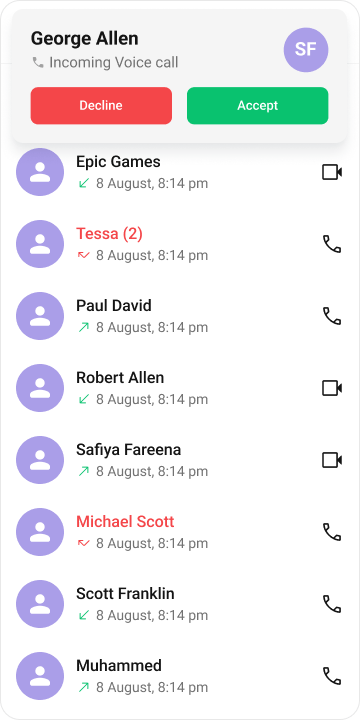 Prerequisites: CometChat SDK initialized with `CometChatUIKit.init()`, a user logged in, and the `cometchat-chat-uikit-android` dependency added.
In your Activity, get a reference and set the `Call` object:
```kotlin YourActivity.kt lines theme={null}
override fun onCreate(savedInstanceState: Bundle?) {
super.onCreate(savedInstanceState)
setContentView(R.layout.layout_activity)
val incomingCall = findViewById(R.id.incoming_call)
incomingCall.setCall(call) // Required — pass the Call object from the SDK
}
```
```java YourActivity.java lines theme={null}
@Override
protected void onCreate(Bundle savedInstanceState) {
super.onCreate(savedInstanceState);
setContentView(R.layout.layout_activity);
CometChatIncomingCall incomingCall = findViewById(R.id.incoming_call);
incomingCall.setCall(call); // Required — pass the Call object from the SDK
}
```
To add programmatically in an Activity:
```kotlin YourActivity.kt lines theme={null}
override fun onCreate(savedInstanceState: Bundle?) {
super.onCreate(savedInstanceState)
val incomingCall = CometChatIncomingCall(this)
incomingCall.setCall(call)
setContentView(incomingCall)
}
```
```java YourActivity.java lines theme={null}
@Override
protected void onCreate(Bundle savedInstanceState) {
super.onCreate(savedInstanceState);
CometChatIncomingCall incomingCall = new CometChatIncomingCall(this);
incomingCall.setCall(call);
setContentView(incomingCall);
}
```
Or in a Fragment:
```kotlin YourFragment.kt lines theme={null}
override fun onCreateView(inflater: LayoutInflater, container: ViewGroup?, savedInstanceState: Bundle?): View {
val incomingCall = CometChatIncomingCall(requireContext())
incomingCall.setCall(call)
return incomingCall
}
```
```java YourFragment.java lines theme={null}
@Override
public View onCreateView(LayoutInflater inflater, ViewGroup container, Bundle savedInstanceState) {
CometChatIncomingCall incomingCall = new CometChatIncomingCall(getContext());
incomingCall.setCall(call);
return incomingCall;
}
```
## Actions and Events
### Callback Methods
#### `setOnAcceptClick`
Fires when the user taps the accept button. Override this to replace the default call-accept behavior.
```kotlin YourActivity.kt lines theme={null}
cometchatIncomingCall.setOnAcceptClick {
// Custom accept logic
}
```
```java YourActivity.java lines theme={null}
cometchatIncomingCall.setOnAcceptClick(new OnClick() {
@Override
public void onClick() {
// Custom accept logic
}
});
```
> **What this does:** Replaces the default accept-button behavior. When the user taps the accept button, your custom `OnClick` lambda executes instead of the built-in call-accept logic.
#### `setOnRejectClick`
Fires when the user taps the reject button. Override this to replace the default call-reject behavior.
```kotlin YourActivity.kt lines theme={null}
cometchatIncomingCall.setOnRejectClick {
// Custom reject logic
}
```
```java YourActivity.java lines theme={null}
cometchatIncomingCall.setOnRejectClick(new OnClick() {
@Override
public void onClick() {
// Custom reject logic
}
});
```
> **What this does:** Replaces the default reject-button behavior. When the user taps the reject button, your custom `OnClick` lambda executes instead of the built-in call-decline logic.
#### `setOnError`
Fires on internal errors (network failure, call failure, SDK exception).
```kotlin YourActivity.kt lines theme={null}
cometchatIncomingCall.setOnError { cometchatException ->
// Handle error
}
```
```java YourActivity.java lines theme={null}
cometchatIncomingCall.setOnError(cometchatException -> {
// Handle error
});
```
> **What this does:** Registers an error listener. If the component encounters an error, your callback receives the `CometChatException` so you can handle it with custom logic.
* **Verify**: After setting an action callback, trigger the corresponding user interaction (tap accept, tap reject) and confirm your custom logic executes instead of the default behavior.
### Global UI Events (CometChatCallEvents)
`CometChatCallEvents` emits events subscribable from anywhere in the application. Add a listener and remove it when no longer needed.
| Event | Fires when | Payload |
| - | - | - |
| `ccCallAccepted` | A call is accepted | `Call` |
| `ccCallRejected` | A call is rejected | `Call` |
| `ccCallEnded` | A call is ended | `Call` |
| `ccOutgoingCall` | An outgoing call is initiated | `Call` |
```kotlin Add Listener lines theme={null}
CometChatCallEvents.addListener("LISTENER_TAG", object : CometChatCallEvents() {
override fun ccCallAccepted(call: Call?) {
super.ccCallAccepted(call)
}
override fun ccCallRejected(call: Call?) {
super.ccCallRejected(call)
}
override fun ccCallEnded(call: Call?) {
super.ccCallEnded(call)
}
})
```
Remove Listener
```
CometChatCallEvents.removeListener("LISTENER_TAG")
```
```java Add Listener lines theme={null}
CometChatCallEvents.addListener("LISTENER_TAG", new CometChatCallEvents() {
@Override
public void ccCallAccepted(Call call) {
super.ccCallAccepted(call);
}
@Override
public void ccCallRejected(Call call) {
super.ccCallRejected(call);
}
@Override
public void ccCallEnded(Call call) {
super.ccCallEnded(call);
}
});
```
Remove Listener
```
CometChatCallEvents.removeListener("LISTENER_TAG");
```
### SDK Events
The component listens to these SDK events internally. No manual attachment needed unless additional side effects are required.
| SDK Listener | Internal behavior |
| - | - |
| `onIncomingCallReceived` | Triggers the incoming call screen display |
| `onIncomingCallCancelled` | Dismisses the incoming call screen |
> Automatic: call state changes update the component in real time.
## Functionality
Small functional customizations such as toggling call sounds and setting custom ringtones.
| Method | Description | Code |
| - | - | - |
| `disableSoundForCalls` | Disables the ringtone for incoming calls | `.disableSoundForCalls(true);` |
| `setCustomSoundForCalls` | Sets a custom ringtone from `res/raw` | `.setCustomSoundForCalls(R.raw.custom_ringtone);` |
* **Verify**: After calling `disableSoundForCalls(true)`, confirm no ringtone plays on incoming calls. After calling `setCustomSoundForCalls`, confirm the custom sound plays.
## Custom View Slots
Each slot replaces a section of the default UI. IncomingCall view slots accept plain `View` objects (not `ViewHolderListener`).
| Slot | Method | Replaces |
| - | - | - |
| Item view | `setItemView(View)` | Entire incoming call card |
| Leading view | `setLeadingView(View)` | Avatar / left section |
| Title view | `setTitleView(View)` | Caller name / title text |
| Subtitle view | `setSubtitleView(View)` | Subtitle text below name |
| Trailing view | `setTrailingView(View)` | Right section |
### `setItemView`
Replace the entire incoming call card with a custom view.
```kotlin YourActivity.kt lines theme={null}
cometchatIncomingCall.setItemView(view)
```
```java YourActivity.java lines theme={null}
cometchatIncomingCall.setItemView(view);
```
> **What this does:** Replaces the entire default incoming call card with your custom `View`. The custom view is responsible for rendering all caller information and call controls.
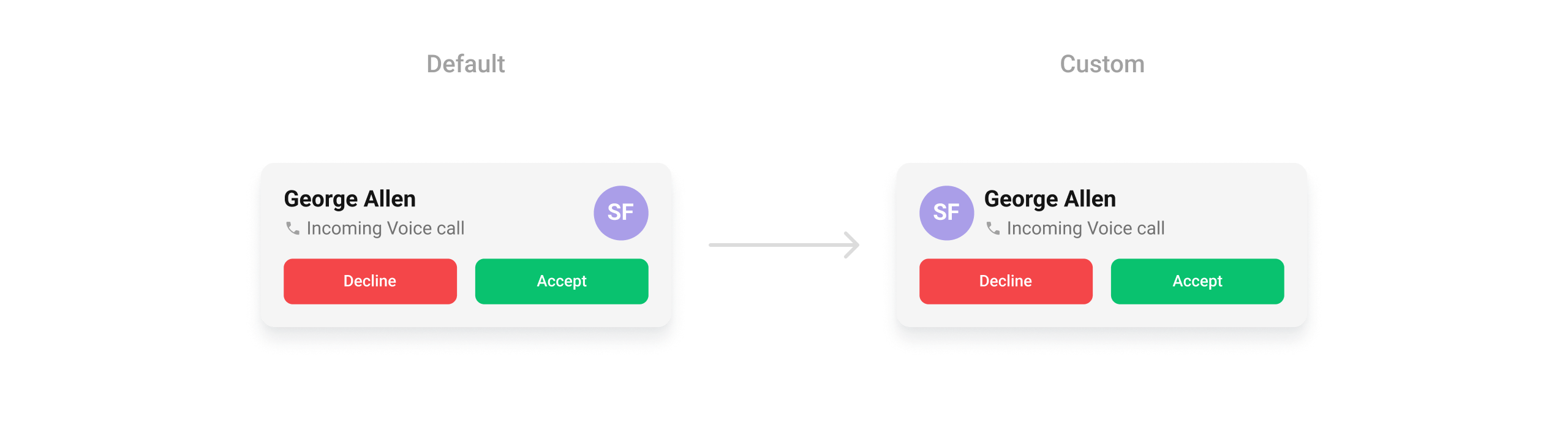
### `setLeadingView`
Replace the avatar / left section.
```kotlin YourActivity.kt lines theme={null}
cometchatIncomingCall.setLeadingView(view)
```
```java YourActivity.java lines theme={null}
cometchatIncomingCall.setLeadingView(view);
```
> **What this does:** Replaces the default leading (left) area of the incoming call screen with your custom `View`.
Example:
Prerequisites: CometChat SDK initialized with `CometChatUIKit.init()`, a user logged in, and the `cometchat-chat-uikit-android` dependency added.
In your Activity, get a reference and set the `Call` object:
```kotlin YourActivity.kt lines theme={null}
override fun onCreate(savedInstanceState: Bundle?) {
super.onCreate(savedInstanceState)
setContentView(R.layout.layout_activity)
val incomingCall = findViewById(R.id.incoming_call)
incomingCall.setCall(call) // Required — pass the Call object from the SDK
}
```
```java YourActivity.java lines theme={null}
@Override
protected void onCreate(Bundle savedInstanceState) {
super.onCreate(savedInstanceState);
setContentView(R.layout.layout_activity);
CometChatIncomingCall incomingCall = findViewById(R.id.incoming_call);
incomingCall.setCall(call); // Required — pass the Call object from the SDK
}
```
To add programmatically in an Activity:
```kotlin YourActivity.kt lines theme={null}
override fun onCreate(savedInstanceState: Bundle?) {
super.onCreate(savedInstanceState)
val incomingCall = CometChatIncomingCall(this)
incomingCall.setCall(call)
setContentView(incomingCall)
}
```
```java YourActivity.java lines theme={null}
@Override
protected void onCreate(Bundle savedInstanceState) {
super.onCreate(savedInstanceState);
CometChatIncomingCall incomingCall = new CometChatIncomingCall(this);
incomingCall.setCall(call);
setContentView(incomingCall);
}
```
Or in a Fragment:
```kotlin YourFragment.kt lines theme={null}
override fun onCreateView(inflater: LayoutInflater, container: ViewGroup?, savedInstanceState: Bundle?): View {
val incomingCall = CometChatIncomingCall(requireContext())
incomingCall.setCall(call)
return incomingCall
}
```
```java YourFragment.java lines theme={null}
@Override
public View onCreateView(LayoutInflater inflater, ViewGroup container, Bundle savedInstanceState) {
CometChatIncomingCall incomingCall = new CometChatIncomingCall(getContext());
incomingCall.setCall(call);
return incomingCall;
}
```
## Actions and Events
### Callback Methods
#### `setOnAcceptClick`
Fires when the user taps the accept button. Override this to replace the default call-accept behavior.
```kotlin YourActivity.kt lines theme={null}
cometchatIncomingCall.setOnAcceptClick {
// Custom accept logic
}
```
```java YourActivity.java lines theme={null}
cometchatIncomingCall.setOnAcceptClick(new OnClick() {
@Override
public void onClick() {
// Custom accept logic
}
});
```
> **What this does:** Replaces the default accept-button behavior. When the user taps the accept button, your custom `OnClick` lambda executes instead of the built-in call-accept logic.
#### `setOnRejectClick`
Fires when the user taps the reject button. Override this to replace the default call-reject behavior.
```kotlin YourActivity.kt lines theme={null}
cometchatIncomingCall.setOnRejectClick {
// Custom reject logic
}
```
```java YourActivity.java lines theme={null}
cometchatIncomingCall.setOnRejectClick(new OnClick() {
@Override
public void onClick() {
// Custom reject logic
}
});
```
> **What this does:** Replaces the default reject-button behavior. When the user taps the reject button, your custom `OnClick` lambda executes instead of the built-in call-decline logic.
#### `setOnError`
Fires on internal errors (network failure, call failure, SDK exception).
```kotlin YourActivity.kt lines theme={null}
cometchatIncomingCall.setOnError { cometchatException ->
// Handle error
}
```
```java YourActivity.java lines theme={null}
cometchatIncomingCall.setOnError(cometchatException -> {
// Handle error
});
```
> **What this does:** Registers an error listener. If the component encounters an error, your callback receives the `CometChatException` so you can handle it with custom logic.
* **Verify**: After setting an action callback, trigger the corresponding user interaction (tap accept, tap reject) and confirm your custom logic executes instead of the default behavior.
### Global UI Events (CometChatCallEvents)
`CometChatCallEvents` emits events subscribable from anywhere in the application. Add a listener and remove it when no longer needed.
| Event | Fires when | Payload |
| - | - | - |
| `ccCallAccepted` | A call is accepted | `Call` |
| `ccCallRejected` | A call is rejected | `Call` |
| `ccCallEnded` | A call is ended | `Call` |
| `ccOutgoingCall` | An outgoing call is initiated | `Call` |
```kotlin Add Listener lines theme={null}
CometChatCallEvents.addListener("LISTENER_TAG", object : CometChatCallEvents() {
override fun ccCallAccepted(call: Call?) {
super.ccCallAccepted(call)
}
override fun ccCallRejected(call: Call?) {
super.ccCallRejected(call)
}
override fun ccCallEnded(call: Call?) {
super.ccCallEnded(call)
}
})
```
Remove Listener
```
CometChatCallEvents.removeListener("LISTENER_TAG")
```
```java Add Listener lines theme={null}
CometChatCallEvents.addListener("LISTENER_TAG", new CometChatCallEvents() {
@Override
public void ccCallAccepted(Call call) {
super.ccCallAccepted(call);
}
@Override
public void ccCallRejected(Call call) {
super.ccCallRejected(call);
}
@Override
public void ccCallEnded(Call call) {
super.ccCallEnded(call);
}
});
```
Remove Listener
```
CometChatCallEvents.removeListener("LISTENER_TAG");
```
### SDK Events
The component listens to these SDK events internally. No manual attachment needed unless additional side effects are required.
| SDK Listener | Internal behavior |
| - | - |
| `onIncomingCallReceived` | Triggers the incoming call screen display |
| `onIncomingCallCancelled` | Dismisses the incoming call screen |
> Automatic: call state changes update the component in real time.
## Functionality
Small functional customizations such as toggling call sounds and setting custom ringtones.
| Method | Description | Code |
| - | - | - |
| `disableSoundForCalls` | Disables the ringtone for incoming calls | `.disableSoundForCalls(true);` |
| `setCustomSoundForCalls` | Sets a custom ringtone from `res/raw` | `.setCustomSoundForCalls(R.raw.custom_ringtone);` |
* **Verify**: After calling `disableSoundForCalls(true)`, confirm no ringtone plays on incoming calls. After calling `setCustomSoundForCalls`, confirm the custom sound plays.
## Custom View Slots
Each slot replaces a section of the default UI. IncomingCall view slots accept plain `View` objects (not `ViewHolderListener`).
| Slot | Method | Replaces |
| - | - | - |
| Item view | `setItemView(View)` | Entire incoming call card |
| Leading view | `setLeadingView(View)` | Avatar / left section |
| Title view | `setTitleView(View)` | Caller name / title text |
| Subtitle view | `setSubtitleView(View)` | Subtitle text below name |
| Trailing view | `setTrailingView(View)` | Right section |
### `setItemView`
Replace the entire incoming call card with a custom view.
```kotlin YourActivity.kt lines theme={null}
cometchatIncomingCall.setItemView(view)
```
```java YourActivity.java lines theme={null}
cometchatIncomingCall.setItemView(view);
```
> **What this does:** Replaces the entire default incoming call card with your custom `View`. The custom view is responsible for rendering all caller information and call controls.
### `setLeadingView`
Replace the avatar / left section.
```kotlin YourActivity.kt lines theme={null}
cometchatIncomingCall.setLeadingView(view)
```
```java YourActivity.java lines theme={null}
cometchatIncomingCall.setLeadingView(view);
```
> **What this does:** Replaces the default leading (left) area of the incoming call screen with your custom `View`.
Example:
 ```xml leading_view.xml lines theme={null}
```
```kotlin YourActivity.kt lines theme={null}
val leadingView: View = LayoutInflater.from(this).inflate(R.layout.leading_view, null)
val avatar = leadingView.findViewById(R.id.avatar)
val callUser = call.callInitiator as User
avatar.setAvatar(callUser.name, callUser.avatar)
leadingView.layoutParams = LinearLayout.LayoutParams(
Utils.convertDpToPx(this, 45),
Utils.convertDpToPx(this, 45)
)
cometchatIncomingCall.setTrailingView(null)
cometchatIncomingCall.setLeadingView(leadingView)
```
```java YourActivity.java lines theme={null}
View leadingView = LayoutInflater.from(this).inflate(R.layout.leading_view, null);
CometChatAvatar avatar = leadingView.findViewById(R.id.avatar);
User callUser = (User) call.getCallInitiator();
avatar.setAvatar(callUser.getName(), callUser.getAvatar());
leadingView.setLayoutParams(new LinearLayout.LayoutParams(
Utils.convertDpToPx(this, 45),
Utils.convertDpToPx(this, 45)
));
cometchatIncomingCall.setTrailingView(null);
cometchatIncomingCall.setLeadingView(leadingView);
```
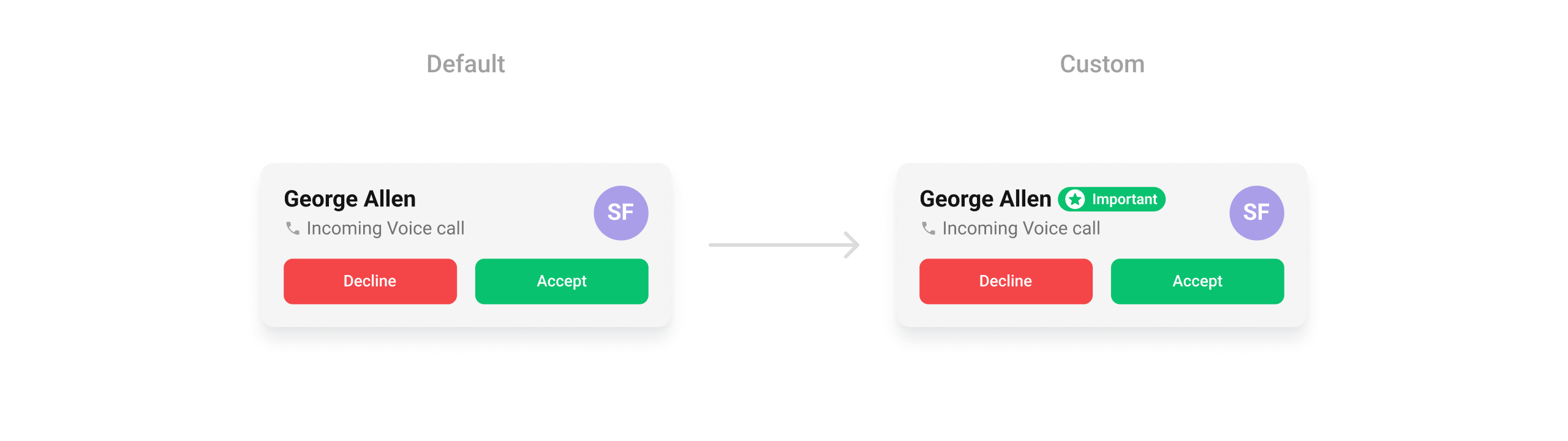
### `setTitleView`
Replace the caller name / title text.
```kotlin YourActivity.kt lines theme={null}
cometchatIncomingCall.setTitleView(view)
```
```java YourActivity.java lines theme={null}
cometchatIncomingCall.setTitleView(view);
```
> **What this does:** Replaces the default title area of the incoming call screen with your custom `View`.
Example:
```xml leading_view.xml lines theme={null}
```
```kotlin YourActivity.kt lines theme={null}
val leadingView: View = LayoutInflater.from(this).inflate(R.layout.leading_view, null)
val avatar = leadingView.findViewById(R.id.avatar)
val callUser = call.callInitiator as User
avatar.setAvatar(callUser.name, callUser.avatar)
leadingView.layoutParams = LinearLayout.LayoutParams(
Utils.convertDpToPx(this, 45),
Utils.convertDpToPx(this, 45)
)
cometchatIncomingCall.setTrailingView(null)
cometchatIncomingCall.setLeadingView(leadingView)
```
```java YourActivity.java lines theme={null}
View leadingView = LayoutInflater.from(this).inflate(R.layout.leading_view, null);
CometChatAvatar avatar = leadingView.findViewById(R.id.avatar);
User callUser = (User) call.getCallInitiator();
avatar.setAvatar(callUser.getName(), callUser.getAvatar());
leadingView.setLayoutParams(new LinearLayout.LayoutParams(
Utils.convertDpToPx(this, 45),
Utils.convertDpToPx(this, 45)
));
cometchatIncomingCall.setTrailingView(null);
cometchatIncomingCall.setLeadingView(leadingView);
```
### `setTitleView`
Replace the caller name / title text.
```kotlin YourActivity.kt lines theme={null}
cometchatIncomingCall.setTitleView(view)
```
```java YourActivity.java lines theme={null}
cometchatIncomingCall.setTitleView(view);
```
> **What this does:** Replaces the default title area of the incoming call screen with your custom `View`.
Example:
 ```xml custom_title_view.xml lines theme={null}
```
```kotlin YourActivity.kt lines theme={null}
val titleView: View = LayoutInflater.from(this).inflate(R.layout.custom_title_view, null)
val title = titleView.findViewById(R.id.title)
title.text = "George Allen"
titleView.layoutParams = LinearLayout.LayoutParams(
ViewGroup.LayoutParams.WRAP_CONTENT,
ViewGroup.LayoutParams.WRAP_CONTENT
)
cometchatIncomingCall.setTitleView(titleView)
```
```java YourActivity.java lines theme={null}
View titleView = LayoutInflater.from(this).inflate(R.layout.custom_title_view, null);
TextView title = titleView.findViewById(R.id.title);
title.setText("George Allen");
titleView.setLayoutParams(new LinearLayout.LayoutParams(
ViewGroup.LayoutParams.WRAP_CONTENT,
ViewGroup.LayoutParams.WRAP_CONTENT
));
cometchatIncomingCall.setTitleView(titleView);
```
### `setSubtitleView`
Replace the subtitle text below the caller's name.
```kotlin YourActivity.kt lines theme={null}
cometchatIncomingCall.setSubtitleView(view)
```
```java YourActivity.java lines theme={null}
cometchatIncomingCall.setSubtitleView(view);
```
> **What this does:** Replaces the default subtitle area of the incoming call screen with your custom `View`. Use this to show additional information below the caller's name.
### `setTrailingView`
Replace the right section of the incoming call card.
```kotlin YourActivity.kt lines theme={null}
cometchatIncomingCall.setTrailingView(view)
```
```java YourActivity.java lines theme={null}
cometchatIncomingCall.setTrailingView(view);
```
> **What this does:** Replaces the default trailing (right) area of the incoming call screen with your custom `View`.
Example:
```xml custom_title_view.xml lines theme={null}
```
```kotlin YourActivity.kt lines theme={null}
val titleView: View = LayoutInflater.from(this).inflate(R.layout.custom_title_view, null)
val title = titleView.findViewById(R.id.title)
title.text = "George Allen"
titleView.layoutParams = LinearLayout.LayoutParams(
ViewGroup.LayoutParams.WRAP_CONTENT,
ViewGroup.LayoutParams.WRAP_CONTENT
)
cometchatIncomingCall.setTitleView(titleView)
```
```java YourActivity.java lines theme={null}
View titleView = LayoutInflater.from(this).inflate(R.layout.custom_title_view, null);
TextView title = titleView.findViewById(R.id.title);
title.setText("George Allen");
titleView.setLayoutParams(new LinearLayout.LayoutParams(
ViewGroup.LayoutParams.WRAP_CONTENT,
ViewGroup.LayoutParams.WRAP_CONTENT
));
cometchatIncomingCall.setTitleView(titleView);
```
### `setSubtitleView`
Replace the subtitle text below the caller's name.
```kotlin YourActivity.kt lines theme={null}
cometchatIncomingCall.setSubtitleView(view)
```
```java YourActivity.java lines theme={null}
cometchatIncomingCall.setSubtitleView(view);
```
> **What this does:** Replaces the default subtitle area of the incoming call screen with your custom `View`. Use this to show additional information below the caller's name.
### `setTrailingView`
Replace the right section of the incoming call card.
```kotlin YourActivity.kt lines theme={null}
cometchatIncomingCall.setTrailingView(view)
```
```java YourActivity.java lines theme={null}
cometchatIncomingCall.setTrailingView(view);
```
> **What this does:** Replaces the default trailing (right) area of the incoming call screen with your custom `View`.
Example:
 ```xml trailing_view.xml lines theme={null}
```
```kotlin YourActivity.kt lines theme={null}
val trailingView: View = LayoutInflater.from(this).inflate(R.layout.trailing_view, null)
val avatar = trailingView.findViewById(R.id.avatar)
val callUser = call.callInitiator as User
if (callUser.tags.contains("pro_user")) {
avatar.setAvatar(ResourcesCompat.getDrawable(resources, R.drawable.pro_user, null)!!)
}
avatar.setAvatar(callUser.name, callUser.avatar)
trailingView.layoutParams = LinearLayout.LayoutParams(
Utils.convertDpToPx(this, 45),
Utils.convertDpToPx(this, 45)
)
cometchatIncomingCall.setTrailingView(trailingView)
```
```java YourActivity.java lines theme={null}
View trailingView = LayoutInflater.from(this).inflate(R.layout.trailing_view, null);
CometChatAvatar avatar = trailingView.findViewById(R.id.avatar);
User callUser = (User) call.getCallInitiator();
if (callUser.getTags().contains("pro_user")) {
avatar.setAvatar(ResourcesCompat.getDrawable(getResources(), R.drawable.pro_user, null));
}
avatar.setAvatar(callUser.getName(), callUser.getAvatar());
trailingView.setLayoutParams(new LinearLayout.LayoutParams(
Utils.convertDpToPx(this, 45),
Utils.convertDpToPx(this, 45)
));
cometchatIncomingCall.setTrailingView(trailingView);
```
* **Verify**: After setting any custom view slot, confirm the custom view renders in the correct position on the incoming call screen and displays the expected caller information.
## Common Patterns
### Silent incoming call
```kotlin lines theme={null}
cometchatIncomingCall.disableSoundForCalls(true)
```
```java lines theme={null}
cometchatIncomingCall.disableSoundForCalls(true);
```
### Custom ringtone
```kotlin lines theme={null}
cometchatIncomingCall.setCustomSoundForCalls(R.raw.my_ringtone)
```
```java lines theme={null}
cometchatIncomingCall.setCustomSoundForCalls(R.raw.my_ringtone);
```
### Custom call settings
```kotlin lines theme={null}
val callSettingsBuilder = CometChatCalls.CallSettingsBuilder(this, true)
.setDefaultAudioMode("SPEAKER")
cometchatIncomingCall.setCallSettingsBuilder(callSettingsBuilder)
```
```java lines theme={null}
CometChatCalls.CallSettingsBuilder callSettingsBuilder = new CometChatCalls.CallSettingsBuilder(this, true)
.setDefaultAudioMode("SPEAKER");
cometchatIncomingCall.setCallSettingsBuilder(callSettingsBuilder);
```
### Override accept to add logging
```kotlin lines theme={null}
cometchatIncomingCall.setOnAcceptClick {
Log.d("IncomingCall", "Call accepted by user")
// Proceed with default accept via ViewModel
cometchatIncomingCall.viewModel.acceptCall(call)
}
```
```java lines theme={null}
cometchatIncomingCall.setOnAcceptClick(() -> {
Log.d("IncomingCall", "Call accepted by user");
// Proceed with default accept via ViewModel
cometchatIncomingCall.getViewModel().acceptCall(call);
});
```
## Advanced Methods
### `setCall`
Sets the `Call` object for the incoming call screen. Required for accept/reject actions to work correctly. The component extracts the caller's name, avatar, and call type from this object.
```kotlin lines theme={null}
cometchatIncomingCall.setCall(call)
```
```java lines theme={null}
cometchatIncomingCall.setCall(call);
```
### `setCallSettingsBuilder`
Provides a custom `CallSettingsBuilder` to configure call settings (audio mode, video resolution, etc.) used when the call is accepted.
```kotlin lines theme={null}
val builder = CometChatCalls.CallSettingsBuilder(this, true)
cometchatIncomingCall.setCallSettingsBuilder(builder)
```
```java lines theme={null}
CometChatCalls.CallSettingsBuilder builder = new CometChatCalls.CallSettingsBuilder(this, true);
cometchatIncomingCall.setCallSettingsBuilder(builder);
```
### Internal Access
These methods provide direct access to internal components for advanced use cases.
| Method | Returns | Description |
| - | - | - |
| `getViewModel()` | `IncomingCallViewModel` | The ViewModel managing call state and actions |
| `getBinding()` | `CometchatIncomingCallComponentBinding` | The ViewBinding for the component's root layout |
> Use these only when the standard API is insufficient. Directly manipulating the ViewModel or binding may conflict with the component's internal state management.
## Style
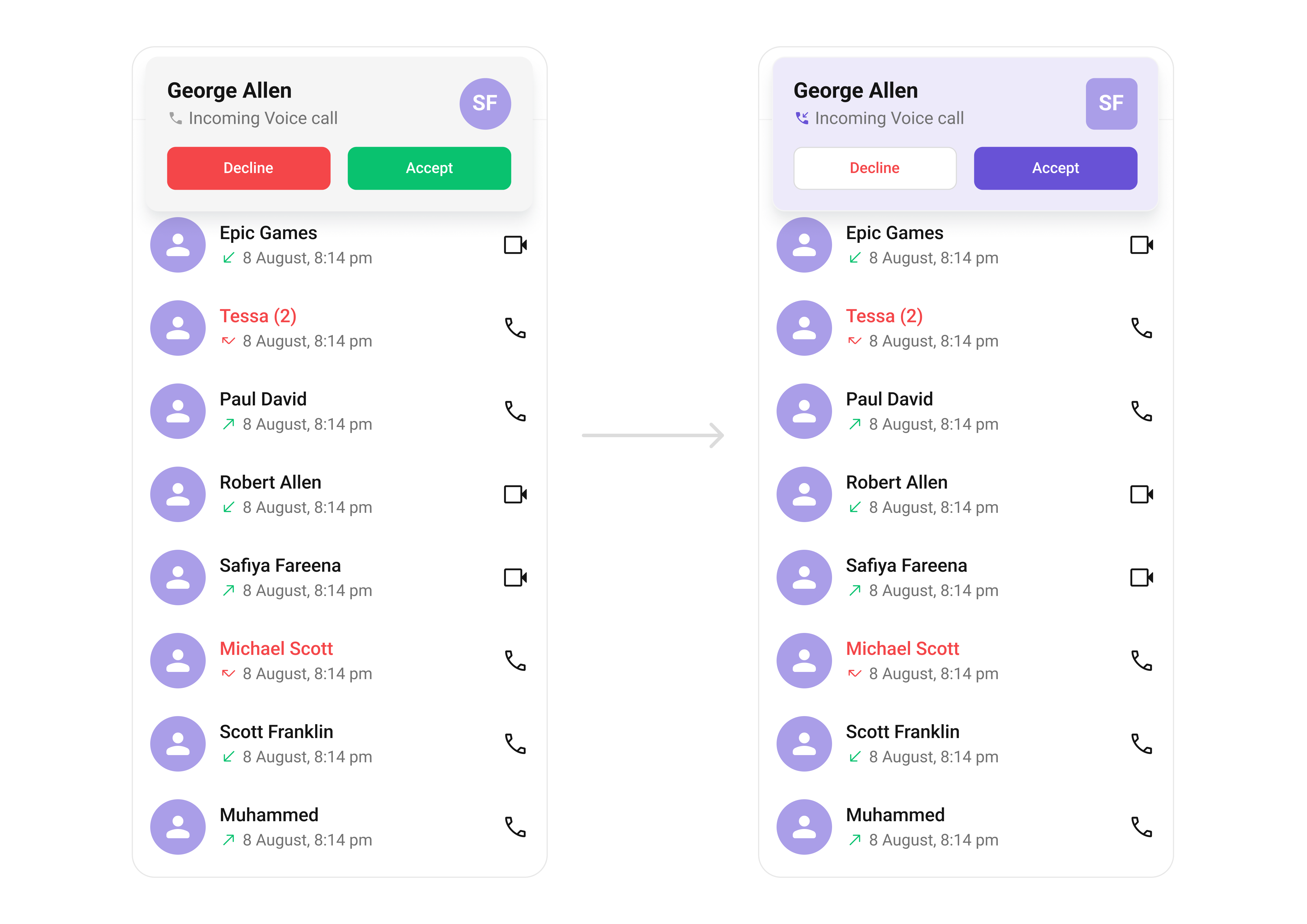
The component uses XML theme styles. Define a custom style with parent `CometChatIncomingCallStyle` in `themes.xml`, then apply with `setStyle()`.
```xml trailing_view.xml lines theme={null}
```
```kotlin YourActivity.kt lines theme={null}
val trailingView: View = LayoutInflater.from(this).inflate(R.layout.trailing_view, null)
val avatar = trailingView.findViewById(R.id.avatar)
val callUser = call.callInitiator as User
if (callUser.tags.contains("pro_user")) {
avatar.setAvatar(ResourcesCompat.getDrawable(resources, R.drawable.pro_user, null)!!)
}
avatar.setAvatar(callUser.name, callUser.avatar)
trailingView.layoutParams = LinearLayout.LayoutParams(
Utils.convertDpToPx(this, 45),
Utils.convertDpToPx(this, 45)
)
cometchatIncomingCall.setTrailingView(trailingView)
```
```java YourActivity.java lines theme={null}
View trailingView = LayoutInflater.from(this).inflate(R.layout.trailing_view, null);
CometChatAvatar avatar = trailingView.findViewById(R.id.avatar);
User callUser = (User) call.getCallInitiator();
if (callUser.getTags().contains("pro_user")) {
avatar.setAvatar(ResourcesCompat.getDrawable(getResources(), R.drawable.pro_user, null));
}
avatar.setAvatar(callUser.getName(), callUser.getAvatar());
trailingView.setLayoutParams(new LinearLayout.LayoutParams(
Utils.convertDpToPx(this, 45),
Utils.convertDpToPx(this, 45)
));
cometchatIncomingCall.setTrailingView(trailingView);
```
* **Verify**: After setting any custom view slot, confirm the custom view renders in the correct position on the incoming call screen and displays the expected caller information.
## Common Patterns
### Silent incoming call
```kotlin lines theme={null}
cometchatIncomingCall.disableSoundForCalls(true)
```
```java lines theme={null}
cometchatIncomingCall.disableSoundForCalls(true);
```
### Custom ringtone
```kotlin lines theme={null}
cometchatIncomingCall.setCustomSoundForCalls(R.raw.my_ringtone)
```
```java lines theme={null}
cometchatIncomingCall.setCustomSoundForCalls(R.raw.my_ringtone);
```
### Custom call settings
```kotlin lines theme={null}
val callSettingsBuilder = CometChatCalls.CallSettingsBuilder(this, true)
.setDefaultAudioMode("SPEAKER")
cometchatIncomingCall.setCallSettingsBuilder(callSettingsBuilder)
```
```java lines theme={null}
CometChatCalls.CallSettingsBuilder callSettingsBuilder = new CometChatCalls.CallSettingsBuilder(this, true)
.setDefaultAudioMode("SPEAKER");
cometchatIncomingCall.setCallSettingsBuilder(callSettingsBuilder);
```
### Override accept to add logging
```kotlin lines theme={null}
cometchatIncomingCall.setOnAcceptClick {
Log.d("IncomingCall", "Call accepted by user")
// Proceed with default accept via ViewModel
cometchatIncomingCall.viewModel.acceptCall(call)
}
```
```java lines theme={null}
cometchatIncomingCall.setOnAcceptClick(() -> {
Log.d("IncomingCall", "Call accepted by user");
// Proceed with default accept via ViewModel
cometchatIncomingCall.getViewModel().acceptCall(call);
});
```
## Advanced Methods
### `setCall`
Sets the `Call` object for the incoming call screen. Required for accept/reject actions to work correctly. The component extracts the caller's name, avatar, and call type from this object.
```kotlin lines theme={null}
cometchatIncomingCall.setCall(call)
```
```java lines theme={null}
cometchatIncomingCall.setCall(call);
```
### `setCallSettingsBuilder`
Provides a custom `CallSettingsBuilder` to configure call settings (audio mode, video resolution, etc.) used when the call is accepted.
```kotlin lines theme={null}
val builder = CometChatCalls.CallSettingsBuilder(this, true)
cometchatIncomingCall.setCallSettingsBuilder(builder)
```
```java lines theme={null}
CometChatCalls.CallSettingsBuilder builder = new CometChatCalls.CallSettingsBuilder(this, true);
cometchatIncomingCall.setCallSettingsBuilder(builder);
```
### Internal Access
These methods provide direct access to internal components for advanced use cases.
| Method | Returns | Description |
| - | - | - |
| `getViewModel()` | `IncomingCallViewModel` | The ViewModel managing call state and actions |
| `getBinding()` | `CometchatIncomingCallComponentBinding` | The ViewBinding for the component's root layout |
> Use these only when the standard API is insufficient. Directly manipulating the ViewModel or binding may conflict with the component's internal state management.
## Style
The component uses XML theme styles. Define a custom style with parent `CometChatIncomingCallStyle` in `themes.xml`, then apply with `setStyle()`.
 ```xml themes.xml lines theme={null}
```
```kotlin lines theme={null}
cometchatIncomingCall.setStyle(R.style.CustomIncomingCallStyle)
```
```java lines theme={null}
cometchatIncomingCall.setStyle(R.style.CustomIncomingCallStyle);
```
To know more such attributes, visit the [attributes file](https://github.com/cometchat/cometchat-uikit-android/blob/v5/chatuikit/src/main/res/values/attr_cometchat_incoming_call.xml).
### Programmatic Style Properties
In addition to XML theme styles, the component exposes programmatic setters for fine-grained control:
| Method | Type | Description |
| - | - | - |
| `setBackgroundColor` | `@ColorInt int` | Background color of the component |
| `setTitleTextColor` | `@ColorInt int` | Text color for the caller name |
| `setTitleTextAppearance` | `@StyleRes int` | Text appearance for the caller name |
| `setSubtitleTextColor` | `@ColorInt int` | Text color for the call type subtitle |
| `setSubtitleTextAppearance` | `@StyleRes int` | Text appearance for the call type subtitle |
| `setIconTint` | `@ColorInt int` | Tint color for the call type icon |
| `setVoiceCallIcon` | `Drawable` | Custom icon for voice calls |
| `setVideoCallIcon` | `Drawable` | Custom icon for video calls |
| `setAcceptCallButtonBackgroundColor` | `@ColorInt int` | Background color for the accept button |
| `setRejectCallButtonBackgroundColor` | `@ColorInt int` | Background color for the reject button |
| `setAcceptButtonTextColor` | `@ColorInt int` | Text color for the accept button |
| `setRejectButtonTextColor` | `@ColorInt int` | Text color for the reject button |
| `setAcceptButtonTextAppearance` | `@StyleRes int` | Text appearance for the accept button |
| `setRejectButtonTextAppearance` | `@StyleRes int` | Text appearance for the reject button |
| `setCornerRadius` | `@Dimension int` | Corner radius of the component card |
| `setStrokeWidth` | `@Dimension int` | Stroke width of the component border |
| `setStrokeColor` | `@ColorInt int` | Stroke color of the component border |
| `setAvatarStyle` | `@StyleRes int` | Style for the caller avatar |
* **Verify**: The incoming call screen displays with a purple background (`#AA9EE8`), custom button colors, and avatars with rounded corners (8dp radius) and an orange background (`#FBAA75`).
## Customization Matrix
| What to change | Where | Property/API | Example |
| - | - | - | - |
| Background color | `themes.xml` | `CometChatIncomingCallStyle` with `cometchatIncomingCallBackgroundColor` | `
```xml themes.xml lines theme={null}
```
```kotlin lines theme={null}
cometchatIncomingCall.setStyle(R.style.CustomIncomingCallStyle)
```
```java lines theme={null}
cometchatIncomingCall.setStyle(R.style.CustomIncomingCallStyle);
```
To know more such attributes, visit the [attributes file](https://github.com/cometchat/cometchat-uikit-android/blob/v5/chatuikit/src/main/res/values/attr_cometchat_incoming_call.xml).
### Programmatic Style Properties
In addition to XML theme styles, the component exposes programmatic setters for fine-grained control:
| Method | Type | Description |
| - | - | - |
| `setBackgroundColor` | `@ColorInt int` | Background color of the component |
| `setTitleTextColor` | `@ColorInt int` | Text color for the caller name |
| `setTitleTextAppearance` | `@StyleRes int` | Text appearance for the caller name |
| `setSubtitleTextColor` | `@ColorInt int` | Text color for the call type subtitle |
| `setSubtitleTextAppearance` | `@StyleRes int` | Text appearance for the call type subtitle |
| `setIconTint` | `@ColorInt int` | Tint color for the call type icon |
| `setVoiceCallIcon` | `Drawable` | Custom icon for voice calls |
| `setVideoCallIcon` | `Drawable` | Custom icon for video calls |
| `setAcceptCallButtonBackgroundColor` | `@ColorInt int` | Background color for the accept button |
| `setRejectCallButtonBackgroundColor` | `@ColorInt int` | Background color for the reject button |
| `setAcceptButtonTextColor` | `@ColorInt int` | Text color for the accept button |
| `setRejectButtonTextColor` | `@ColorInt int` | Text color for the reject button |
| `setAcceptButtonTextAppearance` | `@StyleRes int` | Text appearance for the accept button |
| `setRejectButtonTextAppearance` | `@StyleRes int` | Text appearance for the reject button |
| `setCornerRadius` | `@Dimension int` | Corner radius of the component card |
| `setStrokeWidth` | `@Dimension int` | Stroke width of the component border |
| `setStrokeColor` | `@ColorInt int` | Stroke color of the component border |
| `setAvatarStyle` | `@StyleRes int` | Style for the caller avatar |
* **Verify**: The incoming call screen displays with a purple background (`#AA9EE8`), custom button colors, and avatars with rounded corners (8dp radius) and an orange background (`#FBAA75`).
## Customization Matrix
| What to change | Where | Property/API | Example |
| - | - | - | - |
| Background color | `themes.xml` | `CometChatIncomingCallStyle` with `cometchatIncomingCallBackgroundColor` | `- #AA9EE8
` |
| Icon tint | `themes.xml` | `CometChatIncomingCallStyle` with `cometchatIncomingCallIconTint` | `- ?attr/cometchatPrimaryColor
` |
| Reject button background | `themes.xml` | `CometChatIncomingCallStyle` with `cometchatIncomingCallRejectButtonBackgroundColor` | `- ?attr/cometchatColorWhite
` |
| Accept button background | `themes.xml` | `CometChatIncomingCallStyle` with `cometchatIncomingCallAcceptButtonBackgroundColor` | `- ?attr/cometchatPrimaryColor
` |
| Reject button text color | `themes.xml` | `CometChatIncomingCallStyle` with `cometchatIncomingCallRejectButtonTextColor` | `- ?attr/cometchatErrorColor
` |
| Accept button text color | `themes.xml` | `CometChatIncomingCallStyle` with `cometchatIncomingCallAcceptButtonTextColor` | `- ?attr/cometchatColorWhite
` |
| Reject button text appearance | `themes.xml` | `CometChatIncomingCallStyle` with `cometchatIncomingCallRejectButtonTextAppearance` | `- ?attr/cometchatTextAppearanceButtonMedium
` |
| Accept button text appearance | `themes.xml` | `CometChatIncomingCallStyle` with `cometchatIncomingCallAcceptButtonTextAppearance` | `- ?attr/cometchatTextAppearanceButtonMedium
` |
| Avatar style | `themes.xml` | `CometChatIncomingCallStyle` with `cometchatIncomingCallAvatarStyle` | `- @style/CustomAvatarStyle
` |
| Apply a custom style | Activity/Fragment | `setStyle(int styleRes)` | `cometchatIncomingCall.setStyle(R.style.CustomIncomingCallStyle);` |
| Call object | Activity/Fragment | `setCall(Call)` | `.setCall(call)` |
| Custom call sound | Activity/Fragment | `setCustomSoundForCalls(@RawRes int)` | `.setCustomSoundForCalls(R.raw.custom_ringtone);` |
| Disable call sound | Activity/Fragment | `disableSoundForCalls(boolean)` | `.disableSoundForCalls(true)` |
| Call settings | Activity/Fragment | `setCallSettingsBuilder(CallSettingsBuilder)` | `.setCallSettingsBuilder(builder)` |
| Accept button action | Activity/Fragment | `setOnAcceptClick(OnClick)` | See `setOnAcceptClick` code above |
| Reject button action | Activity/Fragment | `setOnRejectClick(OnClick)` | See `setOnRejectClick` code above |
| Error handler | Activity/Fragment | `setOnError(OnError)` | See `setOnError` code above |
| Entire call card view | Activity/Fragment | `setItemView(View)` | `cometchatIncomingCall.setItemView(view);` |
| Leading view (avatar area) | Activity/Fragment | `setLeadingView(View)` | See `setLeadingView` code above |
| Title view (caller name) | Activity/Fragment | `setTitleView(View)` | See `setTitleView` code above |
| Subtitle view | Activity/Fragment | `setSubtitleView(View)` | `cometchatIncomingCall.setSubtitleView(view);` |
| Trailing view | Activity/Fragment | `setTrailingView(View)` | See `setTrailingView` code above |
## Next Steps
Outgoing call screen with end-call control
Voice and video call initiation buttons
View call history
Browse recent conversations
This documentation is built and hosted on [Mintlify](https://mintlify.com), a developer documentation platform.