> ## Documentation Index
> Fetch the complete documentation index at: https://cometchat-22654f5b-docs-llms-scoped-indexes.mintlify.site/llms.txt
> Use this file to discover all available pages before exploring further.
# Call Bubble
> Call Bubble — CometChat documentation.
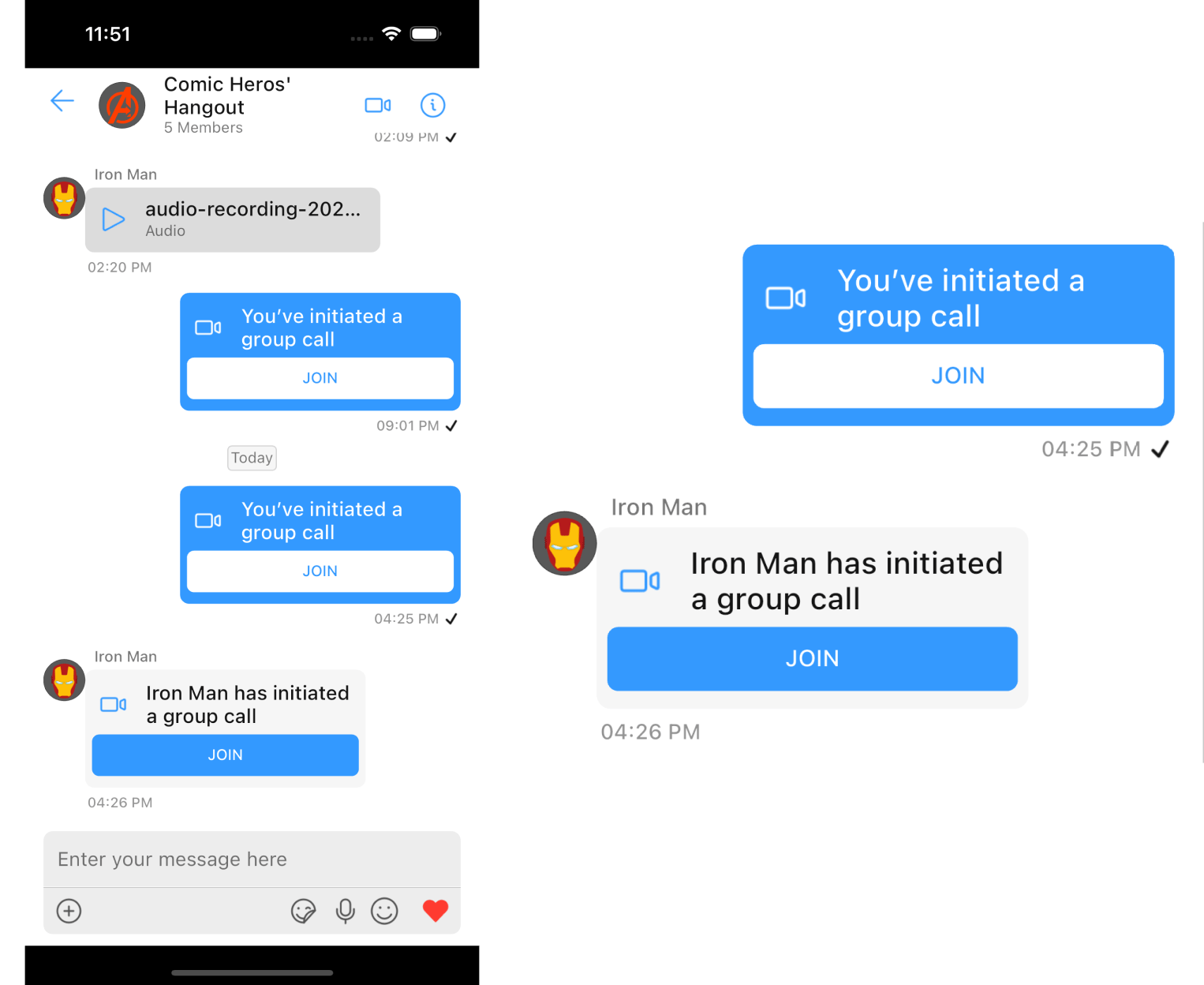
`CometChatCallBubble` is a widget that displays the call information and a button to join a direct call.
If [CometChatMessages](/ui-kit/flutter/v4/messages) has been launched for a `Group` only the video call button will be present in the [CometChatMessageHeader](/ui-kit/flutter/v4/message-header), pressing on which shall navigate the user to the [CometChatOngoingCall](/ui-kit/flutter/v4/ongoing-call) Widget and a [CustomMessage](/sdk/flutter/send-message) will be sent in the background with details for other group members to join the call, this [CustomMessage](/sdk/flutter/send-message#custom-message) will be displayed on the [CometChatMessageList](/ui-kit/flutter/v4/message-list) using this `CometChatCallBubble`.
 ## Usage
`CometChatCallBubble` can be used as a child Widget for a `Container` or SizedBox or along with other children Widgets in a `Row` or `Column`.
```dart theme={null}
CometChatCallBubble(
icon: Icon(Icons.call),
title: 'Call',
buttonText: 'Call',
onTap: (context) {
// TODO("Not yet implemented")
},
callBubbleStyle: CallBubbleStyle(
background: Colors.blue,
),
theme: cometChatTheme,
alignment: BubbleAlignment.left,
);
```
## Properties
| Property | Type | Description |
| - | - | - |
| **icon** | Widget | icon to show in the leading view of the bubble |
| **title** | String | the title to be displayed |
| **buttonText** | String | the text to be displayed on the button |
| **onTap** | Function(BuildContext) | onTap can be used to execute some tasks by tapping the button |
| **callBubbleStyle** | CallBubbleStyle | a CallBubbleStyle object will be used to customize the appearance of the widget |
| **alignment** | BubbleAlignment | alignment will be used to align the widget to determine the appropriate background color and text color |
| **theme** | [CometChatTheme](/ui-kit/flutter/v4/theme) | used to set custom theme |
***
### callBubbleStyle
A `CallBubbleStyle` object will be used to customize the appearance of the widget
| Property | Type | Description |
| - | - | - |
| **titleStyle** | TextStyle | sets the style for the text shown in the title of the `CometChatCallBubble` |
| **subtitleStyle** | TextStyle | sets the style for the text shown in the subtitle of the `CometChatCallBubble` |
| **buttonTextStyle** | TextStyle | sets the style for the text shown on the button of the `CometChatCallBubble` |
| **buttonBackground** | Color | sets the color of the join call button of the call bubble |
| **iconTint** | Color | sets the color for the icon shown in the leading view of the `CometChatCallBubble` |
| **background** | Color | sets the background color of the `CometChatCallBubble` |
| **width** | double | used to set width |
| **height** | double | used to set height |
| **gradient** | Gradient | used to set a gradient background |
| **border** | BoxBorder | used to set border |
| **borderRadius** | double | used to set corner radius |
```dart theme={null}
// Create a CallBubbleStyle object
CallBubbleStyle callBubbleStyle = CallBubbleStyle(
background: Colors.blue,
iconTint: Colors.grey,
titleStyle: TextStyle(
color: Colors.red,
fontSize: 16,
fontWeight: FontWeight.bold,
),
subtitleStyle: TextStyle(
color: Colors.red,
fontSize: 14,
fontWeight: FontWeight.bold,
),
buttonTextStyle: TextStyle(
color: Colors.white, fontSize: 14, fontWeight: FontWeight.bold
),
);
// Pass the CallBubbleStyle object to CometChatCallBubble
CometChatCallBubble(
callBubbleStyle: callBubbleStyle,
);
```
This documentation is built and hosted on [Mintlify](https://mintlify.com), a developer documentation platform.
## Usage
`CometChatCallBubble` can be used as a child Widget for a `Container` or SizedBox or along with other children Widgets in a `Row` or `Column`.
```dart theme={null}
CometChatCallBubble(
icon: Icon(Icons.call),
title: 'Call',
buttonText: 'Call',
onTap: (context) {
// TODO("Not yet implemented")
},
callBubbleStyle: CallBubbleStyle(
background: Colors.blue,
),
theme: cometChatTheme,
alignment: BubbleAlignment.left,
);
```
## Properties
| Property | Type | Description |
| - | - | - |
| **icon** | Widget | icon to show in the leading view of the bubble |
| **title** | String | the title to be displayed |
| **buttonText** | String | the text to be displayed on the button |
| **onTap** | Function(BuildContext) | onTap can be used to execute some tasks by tapping the button |
| **callBubbleStyle** | CallBubbleStyle | a CallBubbleStyle object will be used to customize the appearance of the widget |
| **alignment** | BubbleAlignment | alignment will be used to align the widget to determine the appropriate background color and text color |
| **theme** | [CometChatTheme](/ui-kit/flutter/v4/theme) | used to set custom theme |
***
### callBubbleStyle
A `CallBubbleStyle` object will be used to customize the appearance of the widget
| Property | Type | Description |
| - | - | - |
| **titleStyle** | TextStyle | sets the style for the text shown in the title of the `CometChatCallBubble` |
| **subtitleStyle** | TextStyle | sets the style for the text shown in the subtitle of the `CometChatCallBubble` |
| **buttonTextStyle** | TextStyle | sets the style for the text shown on the button of the `CometChatCallBubble` |
| **buttonBackground** | Color | sets the color of the join call button of the call bubble |
| **iconTint** | Color | sets the color for the icon shown in the leading view of the `CometChatCallBubble` |
| **background** | Color | sets the background color of the `CometChatCallBubble` |
| **width** | double | used to set width |
| **height** | double | used to set height |
| **gradient** | Gradient | used to set a gradient background |
| **border** | BoxBorder | used to set border |
| **borderRadius** | double | used to set corner radius |
```dart theme={null}
// Create a CallBubbleStyle object
CallBubbleStyle callBubbleStyle = CallBubbleStyle(
background: Colors.blue,
iconTint: Colors.grey,
titleStyle: TextStyle(
color: Colors.red,
fontSize: 16,
fontWeight: FontWeight.bold,
),
subtitleStyle: TextStyle(
color: Colors.red,
fontSize: 14,
fontWeight: FontWeight.bold,
),
buttonTextStyle: TextStyle(
color: Colors.white, fontSize: 14, fontWeight: FontWeight.bold
),
);
// Pass the CallBubbleStyle object to CometChatCallBubble
CometChatCallBubble(
callBubbleStyle: callBubbleStyle,
);
```
This documentation is built and hosted on [Mintlify](https://mintlify.com), a developer documentation platform.