> ## Documentation Index
> Fetch the complete documentation index at: https://cometchat-22654f5b-docs-llms-scoped-indexes.mintlify.site/llms.txt
> Use this file to discover all available pages before exploring further.
# Saved Messages
> Display the logged-in user's saved messages across every conversation, with unsave and jump-to-message actions.
```json theme={null}
{
"component": "CometChatSavedMessages",
"package": "@cometchat/chat-uikit-react-native",
"import": "import { CometChatSavedMessages } from \"@cometchat/chat-uikit-react-native\";",
"description": "Lists every message the logged-in user has saved, newest save first. A save is private and spans all conversations, so there is no user or group prop.",
"requires": {
"dashboardFlag": "Save Messages must be enabled for your app in the CometChat Dashboard",
"resolution": "The kit reads the flag at login and re-reads it on every reconnection — no app code required"
},
"props": {
"data": {
"limit": { "type": "number", "default": 30, "note": "Page size for the fetch; the SDK caps it at 100" },
"messagesRequestBuilder": { "type": "CometChat.MessagesRequestBuilder", "default": "undefined", "note": "Base request for the fetch. The component copies it and re-asserts setSavedOnly(true), setPinnedOnly(false) and clears any uid/guid; the limit prop wins over the builder's own setLimit()" },
"textFormatters": { "type": "CometChatTextFormatter[]", "default": "undefined", "note": "Pass the same array given to CometChatMessageList so a row reads the same as it does in the conversation" }
},
"callbacks": {
"onBack": "() => void",
"onItemPress": "(message: CometChat.BaseMessage, source: SavedMessageSource | null) => void"
},
"visibility": {
"hideUnsaveMessageOption": { "type": "boolean", "default": false }
},
"customization": {
"ItemView": "(message: CometChat.BaseMessage) => JSX.Element",
"title": { "type": "string", "default": "localized" },
"style": "DeepPartial"
}
}
}
```
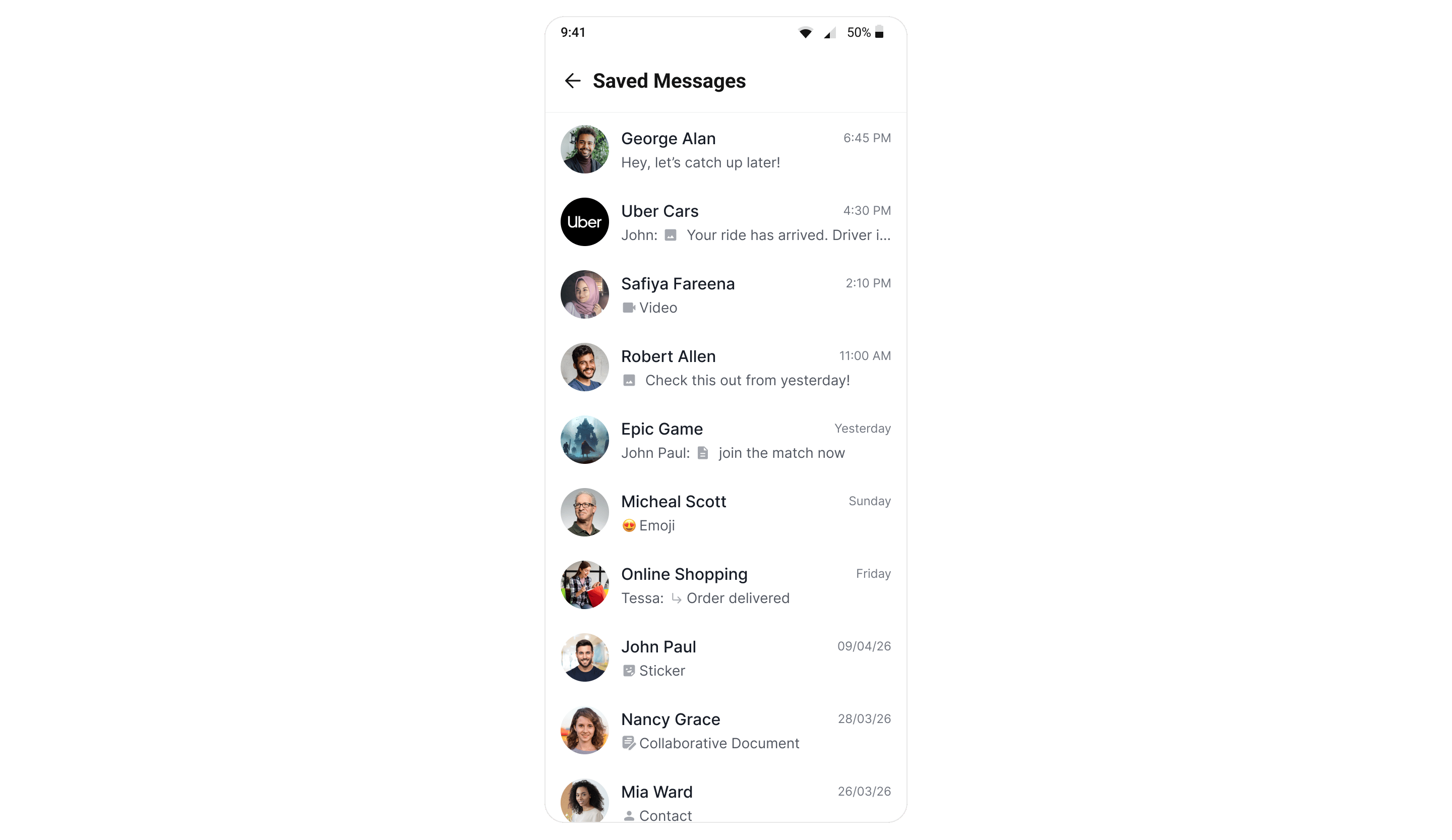
`CometChatSavedMessages` lists every message the logged-in user has saved, newest save first. Unlike a
pin, a save is **private and spans conversations** — nobody else can see it, and the list is not scoped
to a single chat.
**Save Messages must be enabled for your app in the CometChat Dashboard.** Until it is, the Save
option never renders and this panel has nothing to show. The UI Kit reads that flag itself at login
and on every reconnect — there is no app code to write.
**`messagesRequestBuilder` and `textFormatters` require `@cometchat/chat-uikit-react-native` 5.5.1 or later.** Neither prop exists in 5.5.0. Everything else on this page works on either version.
## Where It Fits
Because the list is account-wide, this panel belongs at app level — a tab, a drawer entry, or a
profile screen — not inside a single conversation.
 ## Minimal Render
There is deliberately no `user` or `group` prop. Scoping it to one conversation would defeat the point.
```tsx theme={null}
import { CometChatSavedMessages } from "@cometchat/chat-uikit-react-native";
navigation.goBack()}
onItemPress={(message: CometChat.BaseMessage, source) => {
// `source` carries the conversation the message came from
openConversation(message, source);
}}
/>
```
```jsx theme={null}
import { CometChatSavedMessages } from "@cometchat/chat-uikit-react-native";
navigation.goBack()}
onItemPress={(message, source) => {
openConversation(message, source);
}}
/>
```
## Filtering
Pass a `messagesRequestBuilder` to control which saved messages are fetched — a search term, a
category or type filter, or the page size. Set `setSavedOnly(true)` on the builder to make the
intent explicit; the component re-asserts it on its own copy, so leaving it out is safe.
```tsx theme={null}
import { CometChat } from "@cometchat/chat-sdk-react-native";
import { CometChatSavedMessages } from "@cometchat/chat-uikit-react-native";
```
The component works on a **copy** of your builder and re-asserts `setSavedOnly(true)` and
`setPinnedOnly(false)` on it, so those are safe even if you omit them. Any `uid` / `guid` on the
builder is cleared: saved messages are account-wide, and scoping them to one conversation would
turn this cross-conversation inbox into a per-chat list. Your own instance is never mutated, so the
same builder can also go to [`CometChatPinnedMessages`](/ui-kit/react-native/pinned-messages).
The page size comes from the first of these that is set: the `limit` prop, then the builder's own
`setLimit()`, then `30`.
## Actions and Events
### Callback Props
#### onItemPress
Fires when a saved row is tapped. Because the rows come from different conversations, it hands you a `source` alongside the message so you can open the right chat.
```tsx lines theme={null}
import { CometChatSavedMessages } from "@cometchat/chat-uikit-react-native";
import { CometChat } from "@cometchat/chat-sdk-react-native";
function SavedWithRouting() {
const handleItemPress = (message: CometChat.BaseMessage, source) => {
navigation.navigate("Messages", {
receiverType: source?.receiverType, // "user" | "group"
receiverId: source?.receiverId,
messageId: String(message.getId()),
});
};
return ;
}
```
`source` is `null` when the conversation could not be resolved. Otherwise it carries:
| Field | Type | Description |
| - | - | - |
| `receiverType` | `string` | `"user"` or `"group"` — drives the open-conversation call |
| `receiverId` | `string` | The GUID, or the UID of the other party in a 1-1 |
| `name` | `string` | Plain display name — what the row title shows |
| `label` | `string` | Display text with its sigil, e.g. `#engineering` or `@alice` |
| `avatar` | `string?` | Group icon or user avatar, when the payload carries a hydrated party |
You can also read the routing off the message itself:
```tsx lines theme={null}
{
navigateToConversation({
receiverType: message.getReceiverType(), // "user" or "group"
receiverId: message.getReceiverId(),
conversationId: message.getConversationId(),
});
}}
/>
```
#### onBack
Fires when the back affordance in the header is pressed.
```tsx lines theme={null}
navigation.goBack()} />
```
### Events
| Event | Fires when |
| - | - |
| `ccMessageSaved` / `ccMessageUnsaved` | This device saved or unsaved. |
| `onMessageSaved` / `onMessageUnsaved` | The same user saved on **another** device. |
The panel keeps itself current without a manual refresh, so a save made on a phone appears on that
user's tablet on its own.
A save is **per-viewer**. The same message reads saved for the user who saved it and unsaved for
everybody else — it is never a property of the message globally.
***
## Custom View Slots
| Slot | Signature | Replaces |
| - | - | - |
| `ItemView` | `(message: CometChat.BaseMessage) => JSX.Element` | Entire saved row |
The empty, error and loading states are not view slots on this component. Restyle them through `style.emptyStateStyle` and `style.errorStateStyle` instead — see [Styling](#styling).
### ItemView
Replace the whole row. The default row is a conversation row — avatar, source conversation name, and a one-line preview — so a replacement usually wants the same three pieces.
```tsx lines theme={null}
import { CometChatSavedMessages, useTheme } from "@cometchat/chat-uikit-react-native";
import { CometChat } from "@cometchat/chat-sdk-react-native";
import { View, Text } from "react-native";
function CustomSavedRow() {
const theme = useTheme();
const getItemView = (message: CometChat.BaseMessage) => (
{message.getReceiverId()}
{(message as CometChat.TextMessage).getText?.()}
);
return ;
}
```
***
## Common Patterns
### A saved-messages tab
Because the list is account-wide, a tab or drawer entry is the natural home for it.
```tsx lines theme={null}
(
openConversation(message)}
/>
)}
/>
```
### Read-only list
```tsx lines theme={null}
```
### A custom title and close icon
```tsx lines theme={null}
```
***
## Styling
The component uses the theme system from `CometChatThemeProvider`. Pass a `style` prop to customize the appearance. Every default value resolves from a semantic theme token, so retheming the kit restyles this panel without touching it.
```tsx lines theme={null}
import { CometChatSavedMessages } from "@cometchat/chat-uikit-react-native";
function StyledSavedMessages() {
return (
);
}
```
`SavedMessagesStyle` deliberately has **no `itemStyle`**. The rows are conversation rows and take
their chrome from `theme.conversationStyles.itemStyle` — the same tokens the conversation list
uses — so the two surfaces cannot drift apart. Restyle the rows there and both update together.
### Style Properties
| Property | Type | Description |
| - | - | - |
| `containerStyle` | `ViewStyle` | Root container |
| `headerContainerStyle` | `ViewStyle` | Header row holding the back control and title |
| `titleStyle` | `TextStyle` | Header title text |
| `closeButtonIconStyle` | `ImageStyle` | Size and tint of the back control |
| `closeButtonIcon` | `ImageSourcePropType \| JSX.Element` | Replaces the back icon itself |
| `previewIconStyle` | `ImageStyle` | Type glyph in the row subtitle — image, video, audio, file, sticker |
| `previewIconContainerStyle` | `ViewStyle` | Wrapper around that glyph |
| `menuIconStyle` | `ImageStyle` | Glyph in the long-press menu (Unsave) |
| `emptyStateStyle` | `object` | `containerStyle`, `titleStyle`, `subTitleStyle`, `iconStyle` |
| `errorStateStyle` | `object` | `containerStyle`, `titleStyle`, `subTitleStyle`, `iconStyle` |
***
## Props
All props are optional. There is deliberately no `user` or `group` prop — see [Minimal Render](#minimal-render).
### limit
Page size for the fetch.
| | |
| - | - |
| Type | `number` |
| Default | `30` |
The server rejects a value above 100.
***
### messagesRequestBuilder
Base request used to fetch the saved messages — a search term, a category or type filter, or the
page size. See [Filtering](#filtering).
| | |
| - | - |
| Type | `CometChat.MessagesRequestBuilder` |
| Default | — |
The component copies the builder and re-asserts `setSavedOnly(true)` on the copy, so your instance is never
mutated. The `limit` prop wins over the builder's own `setLimit()`.
***
### textFormatters
Text formatters used when rendering the saved rows. Pass the same array you give
[`CometChatMessageList`](/ui-kit/react-native/message-list), otherwise a message reads differently
here than it does in the conversation. See
[Text Formatters](/ui-kit/react-native/custom-text-formatter-guide).
| | |
| - | - |
| Type | `CometChatTextFormatter[]` |
| Default | Default formatters from the data source |
***
### onBack
Called when the back affordance is pressed.
| | |
| - | - |
| Type | `() => void` |
| Default | — |
***
### onItemPress
Called when a row is pressed. `source` identifies which conversation the message belongs to.
| | |
| - | - |
| Type | `(message: CometChat.BaseMessage, source: SavedMessageSource \| null) => void` |
| Default | — |
`SavedMessageSource` is **not exported from the package root**, so annotate the parameter with its shape
rather than importing the name:
```ts theme={null}
type SavedMessageSource = {
receiverType: string; // "user" | "group" — drives the sigil and the open-conversation call
receiverId: string; // the GUID, or the other party's UID in a 1:1
label: string; // display text, e.g. "#engineering" or "@alice"
name: string; // plain display name, no sigil — what the row title shows
avatar?: string; // group icon or user avatar, when the payload carries one
};
```
It is `null` when the payload has no hydrated conversation to resolve.
***
### hideUnsaveMessageOption
Hides **Unsave** in the row's long-press menu.
| | |
| - | - |
| Type | `boolean` |
| Default | `false` |
***
### ItemView
Replaces the default row entirely.
| | |
| - | - |
| Type | `(message: CometChat.BaseMessage) => JSX.Element` |
| Default | — |
***
### title
Panel title.
| | |
| - | - |
| Type | `string` |
| Default | Localized "Saved Messages" |
***
### style
Per-instance style overrides, merged over the theme's `savedMessagesStyles`.
| | |
| - | - |
| Type | `DeepPartial` |
| Default | — |
See [Styling](#styling).
***
## Next Steps
The conversation-wide, everyone-sees-it counterpart
Where the Save option is raised
The SDK methods underneath this component
Every UI Kit event, in one place
This documentation is built and hosted on [Mintlify](https://mintlify.com), a developer documentation platform.
## Minimal Render
There is deliberately no `user` or `group` prop. Scoping it to one conversation would defeat the point.
```tsx theme={null}
import { CometChatSavedMessages } from "@cometchat/chat-uikit-react-native";
navigation.goBack()}
onItemPress={(message: CometChat.BaseMessage, source) => {
// `source` carries the conversation the message came from
openConversation(message, source);
}}
/>
```
```jsx theme={null}
import { CometChatSavedMessages } from "@cometchat/chat-uikit-react-native";
navigation.goBack()}
onItemPress={(message, source) => {
openConversation(message, source);
}}
/>
```
## Filtering
Pass a `messagesRequestBuilder` to control which saved messages are fetched — a search term, a
category or type filter, or the page size. Set `setSavedOnly(true)` on the builder to make the
intent explicit; the component re-asserts it on its own copy, so leaving it out is safe.
```tsx theme={null}
import { CometChat } from "@cometchat/chat-sdk-react-native";
import { CometChatSavedMessages } from "@cometchat/chat-uikit-react-native";
```
The component works on a **copy** of your builder and re-asserts `setSavedOnly(true)` and
`setPinnedOnly(false)` on it, so those are safe even if you omit them. Any `uid` / `guid` on the
builder is cleared: saved messages are account-wide, and scoping them to one conversation would
turn this cross-conversation inbox into a per-chat list. Your own instance is never mutated, so the
same builder can also go to [`CometChatPinnedMessages`](/ui-kit/react-native/pinned-messages).
The page size comes from the first of these that is set: the `limit` prop, then the builder's own
`setLimit()`, then `30`.
## Actions and Events
### Callback Props
#### onItemPress
Fires when a saved row is tapped. Because the rows come from different conversations, it hands you a `source` alongside the message so you can open the right chat.
```tsx lines theme={null}
import { CometChatSavedMessages } from "@cometchat/chat-uikit-react-native";
import { CometChat } from "@cometchat/chat-sdk-react-native";
function SavedWithRouting() {
const handleItemPress = (message: CometChat.BaseMessage, source) => {
navigation.navigate("Messages", {
receiverType: source?.receiverType, // "user" | "group"
receiverId: source?.receiverId,
messageId: String(message.getId()),
});
};
return ;
}
```
`source` is `null` when the conversation could not be resolved. Otherwise it carries:
| Field | Type | Description |
| - | - | - |
| `receiverType` | `string` | `"user"` or `"group"` — drives the open-conversation call |
| `receiverId` | `string` | The GUID, or the UID of the other party in a 1-1 |
| `name` | `string` | Plain display name — what the row title shows |
| `label` | `string` | Display text with its sigil, e.g. `#engineering` or `@alice` |
| `avatar` | `string?` | Group icon or user avatar, when the payload carries a hydrated party |
You can also read the routing off the message itself:
```tsx lines theme={null}
{
navigateToConversation({
receiverType: message.getReceiverType(), // "user" or "group"
receiverId: message.getReceiverId(),
conversationId: message.getConversationId(),
});
}}
/>
```
#### onBack
Fires when the back affordance in the header is pressed.
```tsx lines theme={null}
navigation.goBack()} />
```
### Events
| Event | Fires when |
| - | - |
| `ccMessageSaved` / `ccMessageUnsaved` | This device saved or unsaved. |
| `onMessageSaved` / `onMessageUnsaved` | The same user saved on **another** device. |
The panel keeps itself current without a manual refresh, so a save made on a phone appears on that
user's tablet on its own.
A save is **per-viewer**. The same message reads saved for the user who saved it and unsaved for
everybody else — it is never a property of the message globally.
***
## Custom View Slots
| Slot | Signature | Replaces |
| - | - | - |
| `ItemView` | `(message: CometChat.BaseMessage) => JSX.Element` | Entire saved row |
The empty, error and loading states are not view slots on this component. Restyle them through `style.emptyStateStyle` and `style.errorStateStyle` instead — see [Styling](#styling).
### ItemView
Replace the whole row. The default row is a conversation row — avatar, source conversation name, and a one-line preview — so a replacement usually wants the same three pieces.
```tsx lines theme={null}
import { CometChatSavedMessages, useTheme } from "@cometchat/chat-uikit-react-native";
import { CometChat } from "@cometchat/chat-sdk-react-native";
import { View, Text } from "react-native";
function CustomSavedRow() {
const theme = useTheme();
const getItemView = (message: CometChat.BaseMessage) => (
{message.getReceiverId()}
{(message as CometChat.TextMessage).getText?.()}
);
return ;
}
```
***
## Common Patterns
### A saved-messages tab
Because the list is account-wide, a tab or drawer entry is the natural home for it.
```tsx lines theme={null}
(
openConversation(message)}
/>
)}
/>
```
### Read-only list
```tsx lines theme={null}
```
### A custom title and close icon
```tsx lines theme={null}
```
***
## Styling
The component uses the theme system from `CometChatThemeProvider`. Pass a `style` prop to customize the appearance. Every default value resolves from a semantic theme token, so retheming the kit restyles this panel without touching it.
```tsx lines theme={null}
import { CometChatSavedMessages } from "@cometchat/chat-uikit-react-native";
function StyledSavedMessages() {
return (
);
}
```
`SavedMessagesStyle` deliberately has **no `itemStyle`**. The rows are conversation rows and take
their chrome from `theme.conversationStyles.itemStyle` — the same tokens the conversation list
uses — so the two surfaces cannot drift apart. Restyle the rows there and both update together.
### Style Properties
| Property | Type | Description |
| - | - | - |
| `containerStyle` | `ViewStyle` | Root container |
| `headerContainerStyle` | `ViewStyle` | Header row holding the back control and title |
| `titleStyle` | `TextStyle` | Header title text |
| `closeButtonIconStyle` | `ImageStyle` | Size and tint of the back control |
| `closeButtonIcon` | `ImageSourcePropType \| JSX.Element` | Replaces the back icon itself |
| `previewIconStyle` | `ImageStyle` | Type glyph in the row subtitle — image, video, audio, file, sticker |
| `previewIconContainerStyle` | `ViewStyle` | Wrapper around that glyph |
| `menuIconStyle` | `ImageStyle` | Glyph in the long-press menu (Unsave) |
| `emptyStateStyle` | `object` | `containerStyle`, `titleStyle`, `subTitleStyle`, `iconStyle` |
| `errorStateStyle` | `object` | `containerStyle`, `titleStyle`, `subTitleStyle`, `iconStyle` |
***
## Props
All props are optional. There is deliberately no `user` or `group` prop — see [Minimal Render](#minimal-render).
### limit
Page size for the fetch.
| | |
| - | - |
| Type | `number` |
| Default | `30` |
The server rejects a value above 100.
***
### messagesRequestBuilder
Base request used to fetch the saved messages — a search term, a category or type filter, or the
page size. See [Filtering](#filtering).
| | |
| - | - |
| Type | `CometChat.MessagesRequestBuilder` |
| Default | — |
The component copies the builder and re-asserts `setSavedOnly(true)` on the copy, so your instance is never
mutated. The `limit` prop wins over the builder's own `setLimit()`.
***
### textFormatters
Text formatters used when rendering the saved rows. Pass the same array you give
[`CometChatMessageList`](/ui-kit/react-native/message-list), otherwise a message reads differently
here than it does in the conversation. See
[Text Formatters](/ui-kit/react-native/custom-text-formatter-guide).
| | |
| - | - |
| Type | `CometChatTextFormatter[]` |
| Default | Default formatters from the data source |
***
### onBack
Called when the back affordance is pressed.
| | |
| - | - |
| Type | `() => void` |
| Default | — |
***
### onItemPress
Called when a row is pressed. `source` identifies which conversation the message belongs to.
| | |
| - | - |
| Type | `(message: CometChat.BaseMessage, source: SavedMessageSource \| null) => void` |
| Default | — |
`SavedMessageSource` is **not exported from the package root**, so annotate the parameter with its shape
rather than importing the name:
```ts theme={null}
type SavedMessageSource = {
receiverType: string; // "user" | "group" — drives the sigil and the open-conversation call
receiverId: string; // the GUID, or the other party's UID in a 1:1
label: string; // display text, e.g. "#engineering" or "@alice"
name: string; // plain display name, no sigil — what the row title shows
avatar?: string; // group icon or user avatar, when the payload carries one
};
```
It is `null` when the payload has no hydrated conversation to resolve.
***
### hideUnsaveMessageOption
Hides **Unsave** in the row's long-press menu.
| | |
| - | - |
| Type | `boolean` |
| Default | `false` |
***
### ItemView
Replaces the default row entirely.
| | |
| - | - |
| Type | `(message: CometChat.BaseMessage) => JSX.Element` |
| Default | — |
***
### title
Panel title.
| | |
| - | - |
| Type | `string` |
| Default | Localized "Saved Messages" |
***
### style
Per-instance style overrides, merged over the theme's `savedMessagesStyles`.
| | |
| - | - |
| Type | `DeepPartial` |
| Default | — |
See [Styling](#styling).
***
## Next Steps
The conversation-wide, everyone-sees-it counterpart
Where the Save option is raised
The SDK methods underneath this component
Every UI Kit event, in one place
This documentation is built and hosted on [Mintlify](https://mintlify.com), a developer documentation platform.