

AI Integration Quick Reference
AI Integration Quick Reference
CometChatPinnedMessages lists the messages pinned in one conversation, newest pin first. A pin is
conversation-wide and visible to everyone, so this panel shows the same set to every participant.
messagesRequestBuilder and textFormatters require @cometchat/chat-uikit-react-native 5.5.1 or later. Neither prop exists in 5.5.0. Everything else on this page works on either version.Where It Fits
Open it from the message header or an overflow menu, scoped to the conversation the user is in. It is a full-screen panel with its own back affordance rather than an inline strip.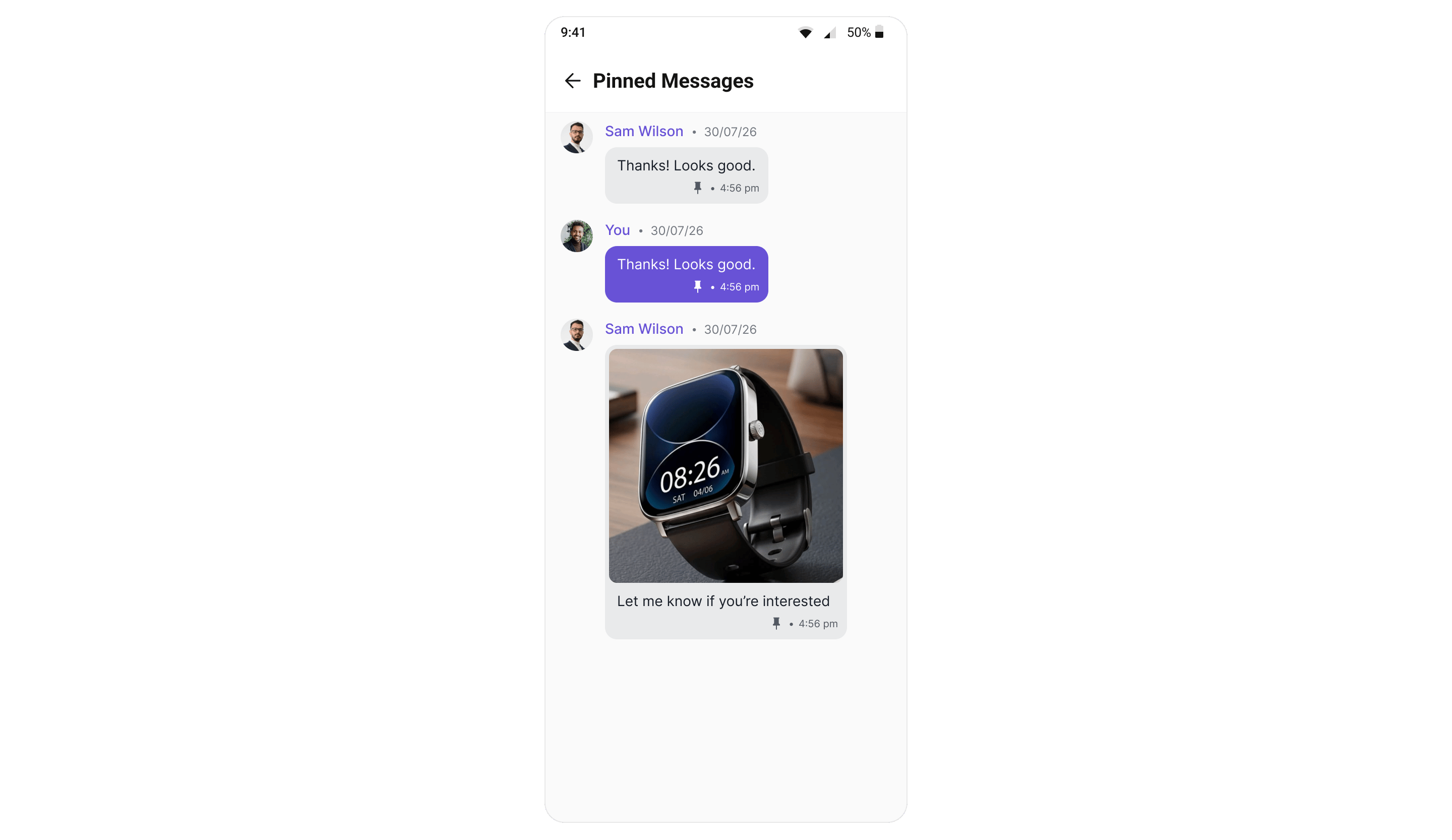
Minimal Render
Pass exactly one ofuser or group — the panel is scoped to a single conversation.
- TypeScript (User)
- TypeScript (Group)
Filtering
Pass amessagesRequestBuilder to control which pinned messages are fetched — a search term, a
category or type filter, or the page size. Set setPinnedOnly(true) on the builder to make the
intent explicit; the component re-asserts it on its own copy, so leaving it out is safe.
- TypeScript
The component works on a copy of your builder and re-asserts
setPinnedOnly(true),
setSavedOnly(false) and the user / group conversation scope on it, so those are safe even if
you omit them — but keep setPinnedOnly(true) in your code to make the intent explicit. Your own
instance is never mutated, so the same builder can also go to
CometChatSavedMessages.limit prop, then the builder’s own
setLimit(), then 30.
Actions and Events
Callback Props
onItemPress
Fires when a pinned row is tapped. The panel does not navigate for you — use it to close the panel and jump your message list to that message.onBack
Fires when the back affordance in the header is pressed.Events
The panel keeps itself current from the kit’s event bus, so a pin made anywhere — this screen, the message list, or another participant’s device — lands here without a manual refresh.Removing asks, adding does not. Unpin and Unsave show a confirmation; Pin and Save run
immediately. This is deliberate and consistent across all CometChat UI Kits — the additive action
has its own undo one tap away, the destructive one does not.
Opening from the Message Header
CometChatMessageHeader can raise the entry point for you. Set showPinnedMessagesButton and handle onPinnedMessagesPress.
Despite the name, this is not a standalone button. It adds a localized “Pinned Messages” item
to the header’s
⋮ overflow menu, alongside anything your own options prop contributes. On a
header with no other menu items, turning it on is what makes the ⋮ appear at all.Custom View Slots
The empty, error and loading states are not view slots on this component. Restyle them through
style.emptyStateStyle and style.errorStateStyle instead — see Styling.
ItemView
Replace the whole row, including the sender line above the bubble.Common Patterns
Read-only panel
Hide every mutating action and leave the panel as a reference list.A custom title and close icon
Styling
The component uses the theme system fromCometChatThemeProvider. Pass a style prop to customize the appearance. Every default value resolves from a semantic theme token, so retheming the kit restyles this panel without touching it.
Style Properties
itemStyle keys:
Props
Provide eitheruser or group, not both. All other props are optional.
user
Scopes the panel to a one-on-one conversation.
Mutually exclusive with
group.
group
Scopes the panel to a group conversation.
Mutually exclusive with
user.
limit
Page size for the fetch.
The server rejects a value above 100.
messagesRequestBuilder
Base request used to fetch the pinned messages — a search term, a category or type filter, or the page size. See Filtering.
The component copies the builder and re-asserts
setPinnedOnly(true) on the copy, so your instance is never
mutated. The limit prop wins over the builder’s own setLimit().
textFormatters
Text formatters used when rendering the pinned rows. Pass the same array you giveCometChatMessageList, otherwise a message reads differently
here than it does in the conversation. See
Text Formatters.
onBack
Called when the back affordance is pressed.onItemPress
Called when a row is pressed.hideUnpinMessageOption
Hides Unpin in the row’s long-press menu.hideSaveMessageOption
Hides Save in the row’s long-press menu.hideUnsaveMessageOption
Hides Unsave in the row’s long-press menu.hideCopyMessageOption
Hides Copy.hideShareMessageOption
Hides Share.hideMessageInfoOption
Hides Message Info.ItemView
Replaces the default row entirely.title
Panel title.style
Per-instance style overrides, merged over the theme’spinnedMessagesStyles.
See Styling.
Next Steps
Saved Messages
The private, cross-conversation counterpart
Message List
Where the Pin and Save options are raised
Pin A Message (SDK)
The SDK methods underneath this component
Events
Every UI Kit event, in one place